


Hey everyone. Today’s post is about structuring your AI agent stack — written by a solo operator who learned the hard way that 15 automations without architecture is just chaos in disguise.
At a Glance
In this piece, you will learn how to:
Understand why your AI stack breaks (and which layer to blame)
Apply a simple 3-layer architecture to any solo operator setup
Replace individual tools without rebuilding everything from scratch
This post is prepared with Guest Author - Jurgen Appelo . Creator of Solo Chief If you also want to write for Creators AI - send us email here
When your AI stack breaks, do you know which layer to open? A proper AI agent architecture tells you exactly where to look.
A few weeks ago, I realized my AI infrastructure sucked.
After a year of experimenting with LLMs, I had ChatGPT, Claude, and Gemini all cross-contaminating each other’s project contexts. My data looked as if it had been distributed by a hand grenade across file systems and cloud services. I used Claude Cowork, NotebookLM, and Perplexity like a five-year-old uses a box of crayons. And I had workflows and business processes flowing and connecting like a bowl of spaghetti that someone dropped from the tenth floor.
If I ever wanted to scale my business, I needed to stop treating my architecture like a junkyard.
Does that sound familiar?
This and many other practical posts on building with AI are available exclusively to our subscribers
The Lasagna Principle: Why Your AI Agent Architecture Needs Layers
Here’s what I’ve learned from years of building software and months of wiring AI agents together: when you’re the only one responsible for the whole stack, sloppy wiring isn’t just a nuisance. It’s a liability you carry alone.
Every solo operator who’s tried building an AI agent orchestration stack hits the same wall. They start with one automation. It works. They add a second. Still fine. By the fifteenth or sixteenth, they’re staring at a clump of Christmas tree wiring where a Slack message somehow triggers a scraper that writes to a database that kicks off another workflow that occasionally emails a client the wrong welcome email.
We wrote a full breakdown for solo operators building with agents in 2026 — check out 4 Ways Monetize AI Agents in 2026 for real patterns and examples.
Software engineers addressed this problem decades ago with N-tier architecture. The idea is old and boring, which is exactly why it works: you separate your system into layers, and each layer only talks to the one directly above or below it. Your interface doesn’t know how you store your data; your data doesn’t care how your workflows run. Each layer minds its own business.
I think of it as lasagna instead of spaghetti. Similar ingredients, completely different structure. And when something breaks (because it always will), you know exactly which layer to open up and poke around in.
“I think of it as lasagna instead of spaghetti. Similar ingredients, completely different structure.”
For my AI agent orchestration stack, I keep it simple with just three layers: a UX layer where I interact with the system, a workflow layer where automations orchestrate the work, and a persistence layer where state lives and persists.
The UX layer is the surface where a person (or agent) touches the system. It could be a Slack message, a Claude Cowork command, a voice prompt, even a button on a vibe-coded web app. The point is that this layer knows nothing about what happens next. It just accepts input and, eventually, shows output.
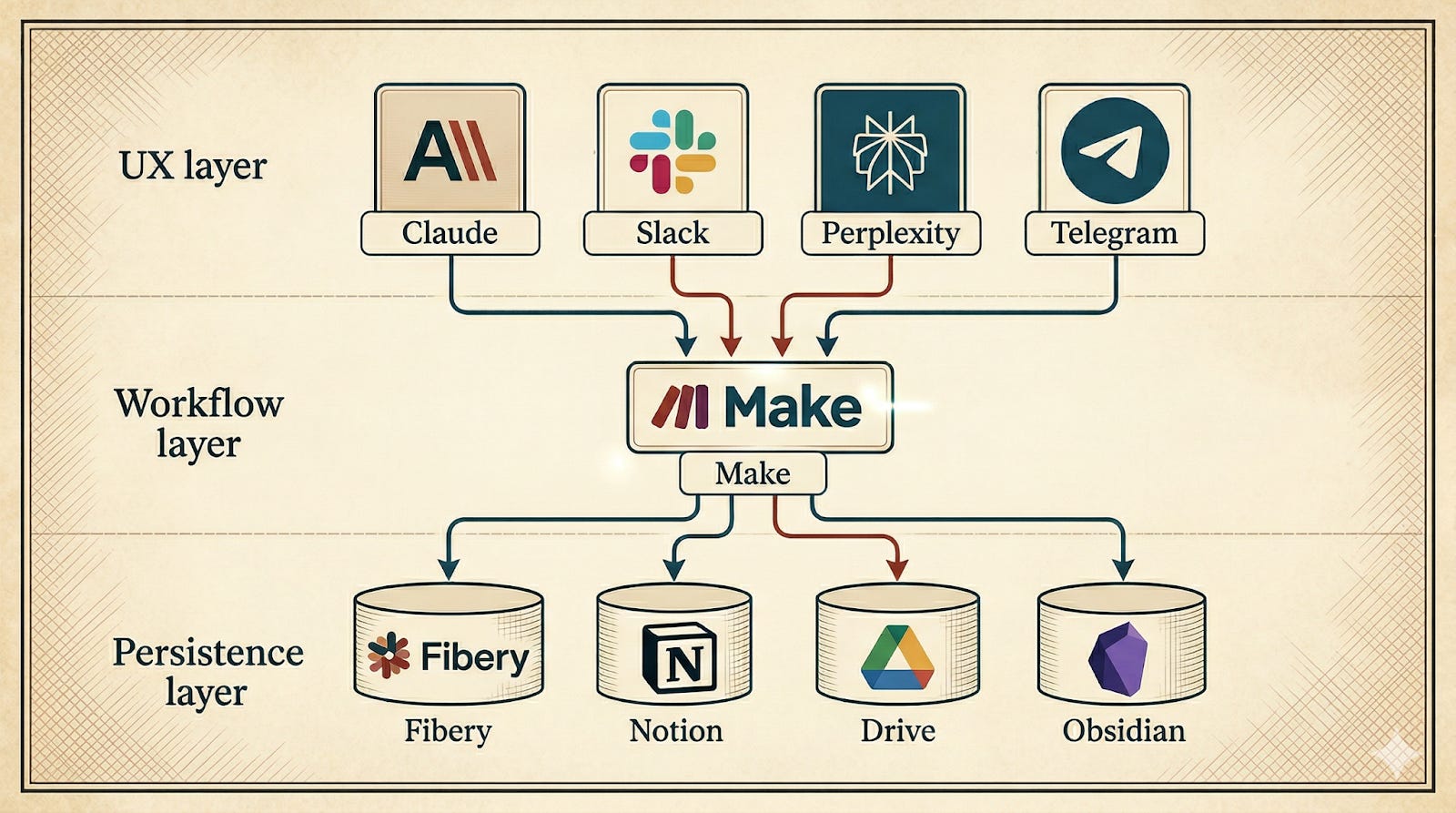
The workflow layer is the heart of any AI agent orchestration setup. It’s where the (mostly) deterministic logic lives: the if-this-then-that decisions, the error handling, the retries. The workflow layer doesn’t store anything itself, and it doesn’t talk to humans directly. It just orchestrates. Receive a trigger, do some work, pass the result.
If you're using Claude's ecosystem as your workflow layer, we covered orchestration in depth: Skills, Plugins, Swarm Mode: Practical Tips with Claude.
The persistence layer doesn’t know or care that Make or n8n or Zapier sent the data. It could just as easily have come from a Python script or a manual import. The schema is stable regardless of what’s happening in the layers above.
Why AI Agent Orchestration Needs Layers
The real payoff of proper AI agent architecture: you can replace any layer without rebuilding the whole stack. You can swap tools in and out without having to go back to Cursor or Claude Code for a minor change.
“That’s the real payoff of proper AI agent architecture: you can replace any layer without rebuilding the whole stack.”
I’d be lying if I said it’s all upside. Having more layers means more things that can break independently. Debugging a failure that starts in Slack, passes through Make, and surfaces as a wrong value in Fibery is like playing a game of telephone with robots. It takes longer to set up than a quick-and-dirty single-tool solution. And there’s a constant temptation to over-engineer — to add a fourth or fifth layer “just in case” when what you actually need is to ship something.
Tools like Claude Cowork can sit cleanly in your workflow layer — handling browser automation, file management, and multi-step agent tasks without leaking into your UX or persistence layers.
I’m building slower than the hammock crowd. But at 8 AM, when something broke and there’s nobody to call, I want to know which layer to open. That’s worth the extra time.
The real question every Solo Chief has to answer for themselves: how much structure is worth the slowdown? I don’t have a formula for that. I only know what my tolerance for 8 AM debugging sessions is, and it’s getting lower every year.
Is your AI stack already split into layers — or still one big tangle? Share with us in the comments!
From Spaghetti to Lasagna: Building Your AI Agent Stack
Am I happy with the AI agent orchestration architecture I have now? Not yet. I still have too much spaghetti and too little lasagna. But the direction is clear, and that makes all the difference. Every update I make to my agentic orchestration must satisfy the N-tier architecture. Every new piece I add goes into one of three places: UX layer, workflow layer, or persistence layer.
Now that I have the horizontal architecture fleshed out, I can start separating the agents into their own vertical domains: one agent for Nonfiction Writing, one for Finance & Admin, one for Personal Branding, and so on. Each with their own objectives. Each with their own layers. My agentic organization will look less like a junkyard and more like something I’d trust to run while I’m asleep.
An unorganized bunch of wires will work fine as long as you’re still experimenting. But for anything more serious and viable, you’ll want to think about giving your AI agent orchestration stack a bit more structure.
Share this post with someone who’s still running spaghetti architecture and wondering why things keep breaking
What does your AI stack look like right now — and what’s the one layer you’d fix first? Drop it in the comments — I’d love to know.