

Hi there!
In one of the digests, I mentioned that Collins Dictionary picked “Vibe Coding” as its Word of the Year. Well…I’d actually stick with just “Vibe” as the word is clearly going down and spawning another new layer of meaning.
Today, we’re talking about Vibe Designing. And it feels like exactly what designers who were deep into Vibe Coding were missing — you know, some actual life behind the pixels. It’s all about the little branches and tiny details that shape the whole user experience, rather than rigid methods.
In this article, I’m gonna break down:
What Vibe Design even is.
What it’s trying to achieve.
And how designers and developers can use it to open up new creative possibilities.
Let’s dive in!
What Vibe Designing Means
Not gonna lie, hearing about another vibe-shift this year had me rolling my eyes. But after digging into it for hours, I started seeing Vibe Designing as a pretty logical follow-up to Vibe Coding. Should it have its own “official” status? That’s for you to judge later. Now, let’s first unpack what this thing is even made of.
Vibe designing aims to flip how we think about building UX with AI. It’s not about stitching together static screens but about the mood and the overall feel of the experience.
Cool cool. Now designers should guess the exact mood the screen should emit…Just a joke, that’s always been part of the job. At least now it might finally get easier to pull it off with Vibe designing.
And to make it clearer, let’s compare it to Vibe Coding.
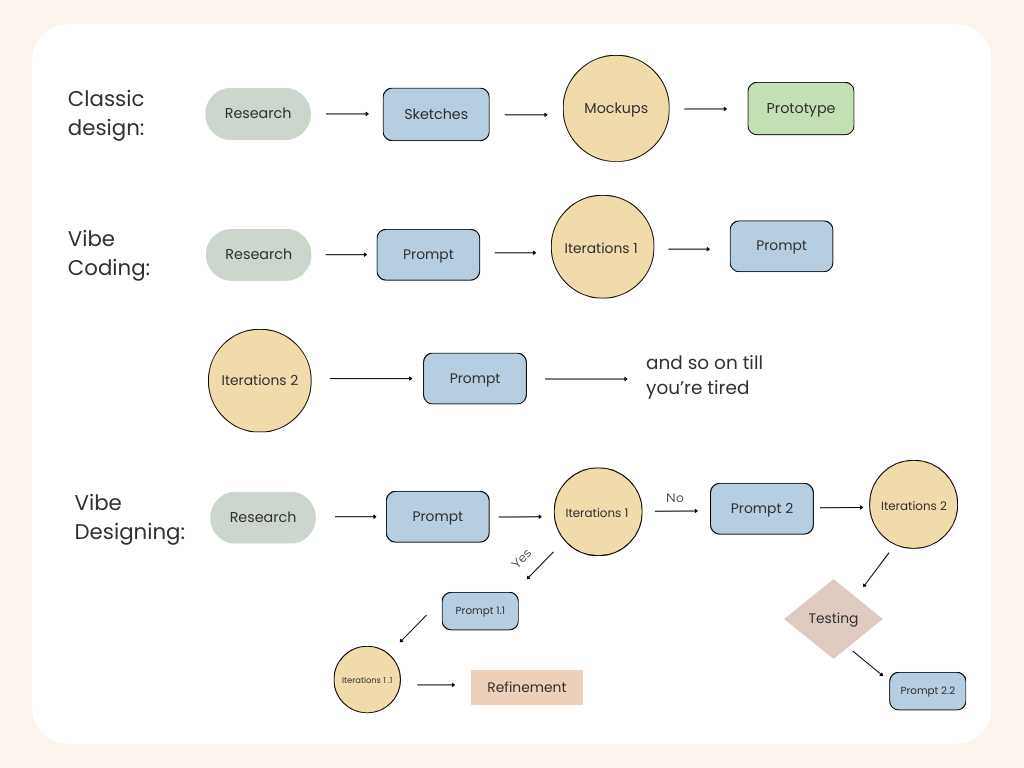
Vibe Coding is changing how software gets built. Tools like Lovable or Cursor all follow the same linear routine.
You throw in a prompt → It builds something → You tweak the prompt → It rebuilds. It’s basically a straight conveyor belt.
Traditional design also lives inside static wireframes. From my experience working in design, I know that we follow a clear structure, and often work through it all sequentially, by hand.
Vibe designing, though, plays a totally different game. More like, it connects how these two directions actually work together.
Instead of typing something dry like “design a user profile page,” we can drop a screenshot of their homepage and say: “Build a profile section with stats cards, an activity feed, and a settings menu. Make it feel just clean and energetic.”
The whole point is that design gets created efficiently, but it actually reflects the values of whoever’s behind it.
The Core Ingredients of Vibe Designing
So we’re talking about non-linear flow. First, you generate several vibe directions, test what actually resonates, and then you dive into research and refinement once the mood you need is clear.
Designers (and not only) can describe the feeling they’re looking for, warm, energetic, premium, chaotic-in-a-good-way, and AI fills in the blanks with colors, motion, typography, and layout ideas that match the emotional target.
All this is supposed to trigger the right emotional response.
To set up this code, we resort to multi-modal inputs. The vibe isn’t set by text alone; there are reference images, URLs, sketches, sometimes voice or user metrics, all come together to shape the target vibe.
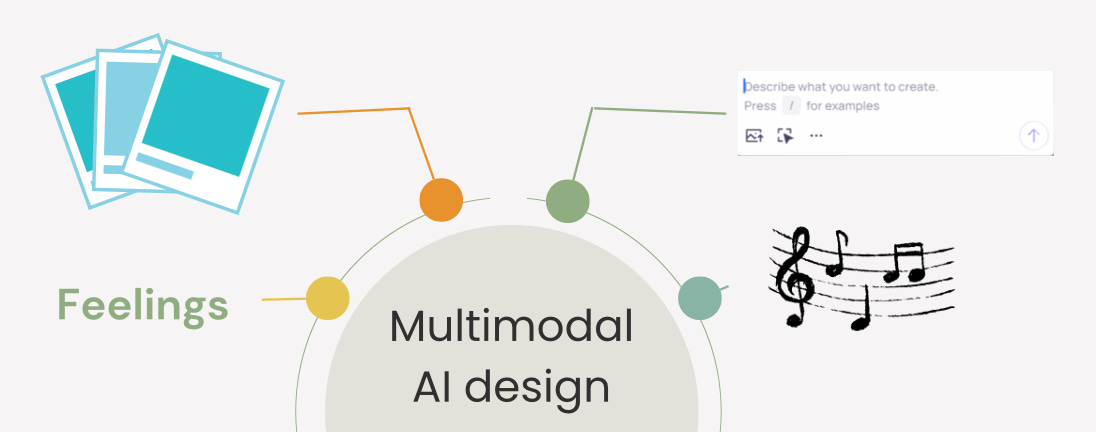
And later on, teams load the AI with brand guides, tokens, and examples of “the right vibe”.
This workflow blurs the traditional roles. Designers can spin up functional UI pieces without waiting on engineers, and devs can tweak visuals without touching Figma.
Vibe Coding already opened the door for non-programmers, but Vibe Designing lets literally anyone create good-looking interfaces (founders, PMs, engineers, whoever you want), because you’ll be able to describe how you feel.
AI combs through user feedback, comments, and session data and spits out clear insights. This continuous loop between design and research results in faster iterations and more refined user experiences.
This way, it establishes trust by maintaining a cohesive design language across all touchpoints, branding, tone, design elements, the whole package. And you’re placing the user at the core of your design process, so the final product actually meets their needs and expectations.
And just like this, as Vibe Coding democratizes programming, Vibe Designing does the same for design.
In turn, people say it’s not suitable for building real apps. Since Vibe Designing tools prioritize visuals, user flows, and quick iteration, what they produce isn’t a fully functional app. To actually ship something, these folks believe that it still needs to be plugged into a bigger workflow with development tools.
But! The thing is that Vibe designers use canvas-based tools where the editing experience is incredibly flexible. You can:
Complement what AI has created with drag-and-drop elements provided by the tool.
Annotate the design with digital sticky notes or diagram connectors.
Or allow freeform and easy for others to jump in and collaborate on.
So I guess all these tools for app and design creation are going to adapt just as quickly as photo and video generation tools adjusted to new trends.
Here you can check out other tools that break the usual rules too, and make you feel that you can do anything (I really felt this way):


What Problems It Solves
1. Product consistency
The product feels inconsistent because teams use different “mental models.” I bet you faced this problem, because it followed me all the time. The PM holds one product mood in their head. Designer — another. The founder, unfortunately, has a third.
Solution
Vibe Designing creates a unified emotional system through a vibe lexicon. Everyone works from the same vocabulary and visual references, so the feeling stays consistent no matter who’s building what.
Here’s how teams can implement this:
Collect reference images, successful prompts, brand guidelines, and design tokens in one shared space. Make it accessible to everyone (don’t forget open access, hehe)
Drop screenshots, URLs, mood boards, or voice notes into the AI as a team. This sets a shared emotional foundation from the start.
2. Rapid Prototyping
Now that we’ve tackled the communication problem, let’s remember: design is art, and art can’t be just a mechanical process.
I always create multiple versions of the same screen to explore different directions, but it takes FOREVER. While Vibe Coding typically generates just one version at a time, you get a single output per prompt.
Frankly speaking, I’ve seen guys trying to hack Claude Code or Lovable into producing multiple design options at once, but it wasn’t that successful.
Instead of spending hours building components by hand, designers can just describe what they want, and AI tools will generate several interactive prototypes.
Solution
There are already plenty of tools that deal with this problem.
For example, I chose Figma AI for my experiment and stuck to a simple prompt:
Create four different prototype variations for the main screen of a coffee shop app.

Keep the core content the same: header with logo, featured drink of the day, menu categories (coffee, tea, pastries), and a bottom navigation bar.

Explore different vibes and layouts.

Version 1: clean and minimal, tight spacing, neutral colors.

Version 2: warm and cozy, textured backgrounds, hand-drawn accents.

Version 3: modern and energetic, bold typography, large product cards.

Version 4: premium and calm, lots of whitespace, subtle motion cues.

Make all main elements interactive and ready for quick testing.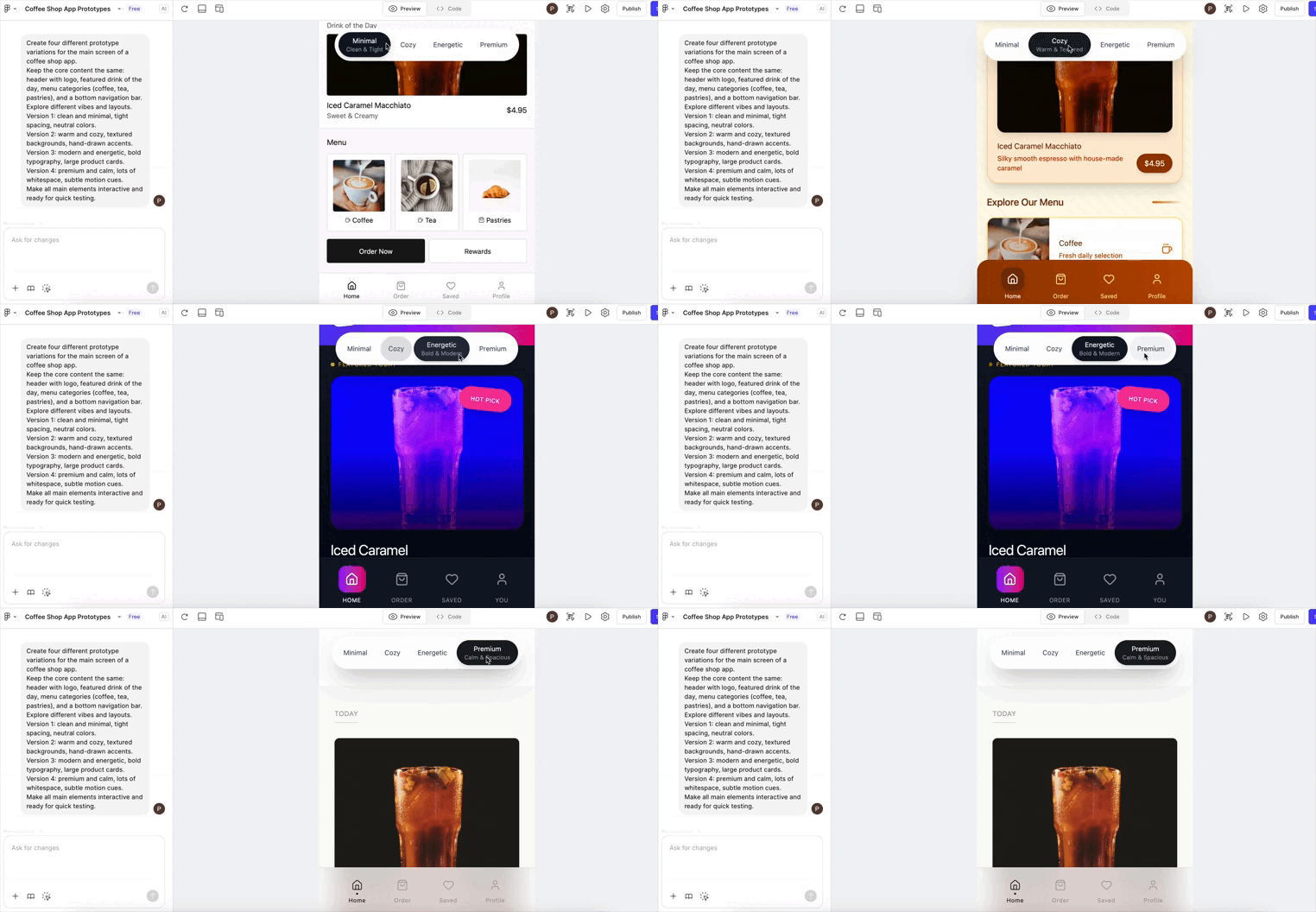
And voila! I had my feelings, and it brought four different versions of them to life.
