

Hi, it's Daniil.
I already have an always-on AI agent. Actually, I have a small stack of them.
Hermes lives in my Telegram, remembers both of my businesses, and runs my briefings, planning, research, and coordination. OpenClaw still handles several headless jobs and long scrapes. Paperclip is the management layer I would reach for when the number of agents becomes harder to track than the work itself.
A little context: I have already documented the seven tools in my current AI stack and why I rebuilt my OpenClaw setup on Hermes. This is not a clean-slate review. It is a comparison from someone already living with these systems every day.
So when Grok Bot took over my X & Instagram feed, my first question was "is this worthy adding to my stack?"
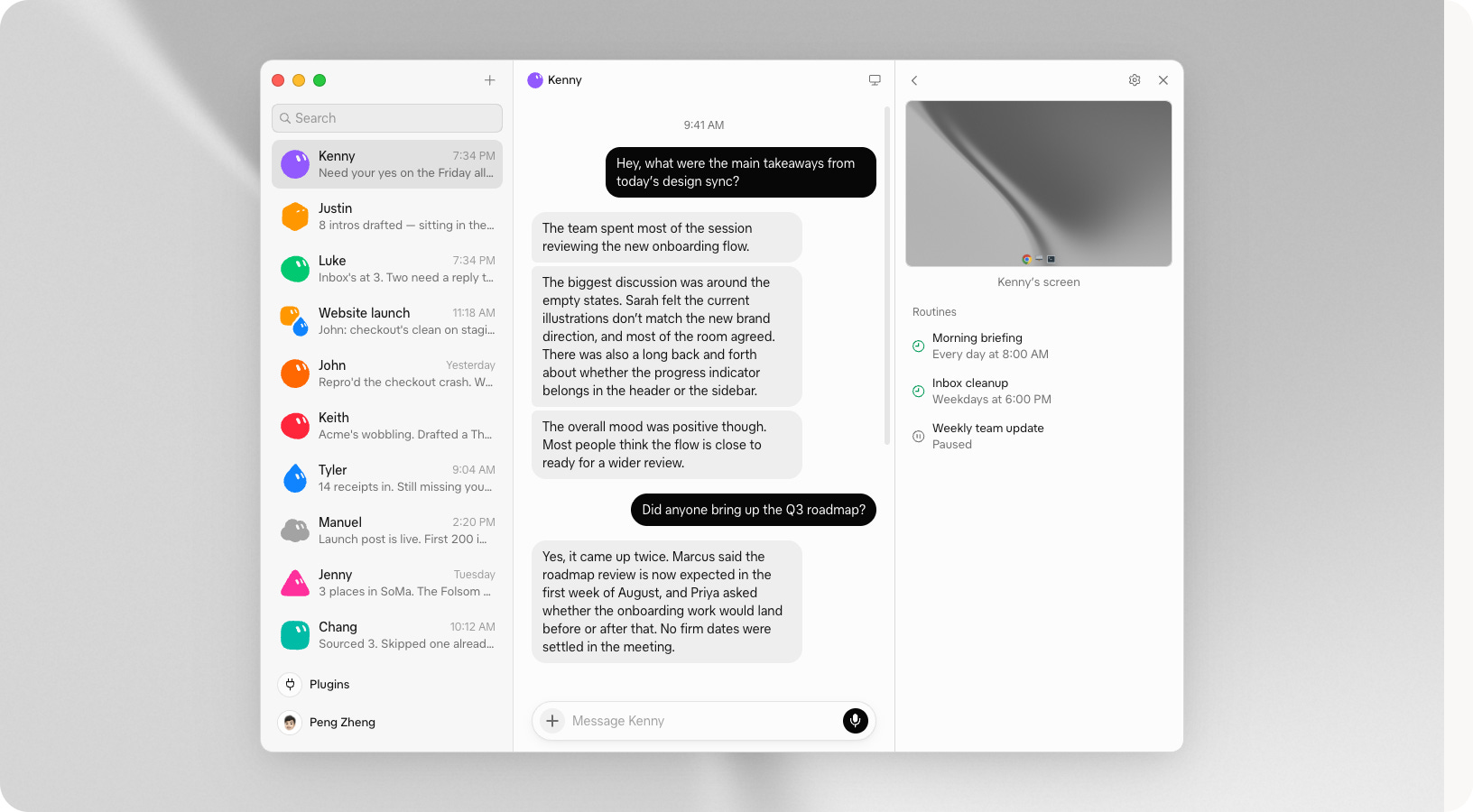
Grok Bot launched in beta on August 11. It gives you persistent, named AI teammates that can use a cloud browser, files, a terminal, plugins, and scheduled routines. You message a Bot, close your laptop, and the work can keep moving.
One Bot reportedly negotiated a $10,000 sponsorship in four hours. Another turned years of meetings into a thousand-person CRM. A small business used one across permits, insurance documents, work orders, and supplier applications.
I went through the product, official documentation, real workflows, and the failure reports to map it against the agent stack I already use.
My answer: Grok Bot does not make Hermes, OpenClaw, or Paperclip obsolete. It packages the most useful parts of that world into the easiest interface I have seen so far.
The second half of this post is the exact first Bot I would build for Creators' AI: a Signal Scout that researches X and YouTube, filters repeated launch noise, and returns a source-linked briefing every morning.
At a Glance
Grok Bot is the easiest managed option: polished interface, cloud computer, browser, plugins, specialist Bots, and routines without a VPS.
It’s not going to do everything you couldn’t do with Claude or Codex
Hermes remains my choice for deep personal context, Telegram-first work, portable skills, and control over the model and hosting.
The full Creators' AI Signal Scout setup, prompts, routine, and safety rules are below the paywall.
What Grok Bot Actually Is
Most AI tools are organized around conversations. You open a new chat, explain yourself again, get an answer, and lose the thread in a sidebar full of vague titles.
Grok Bot organizes the product around Bots instead.
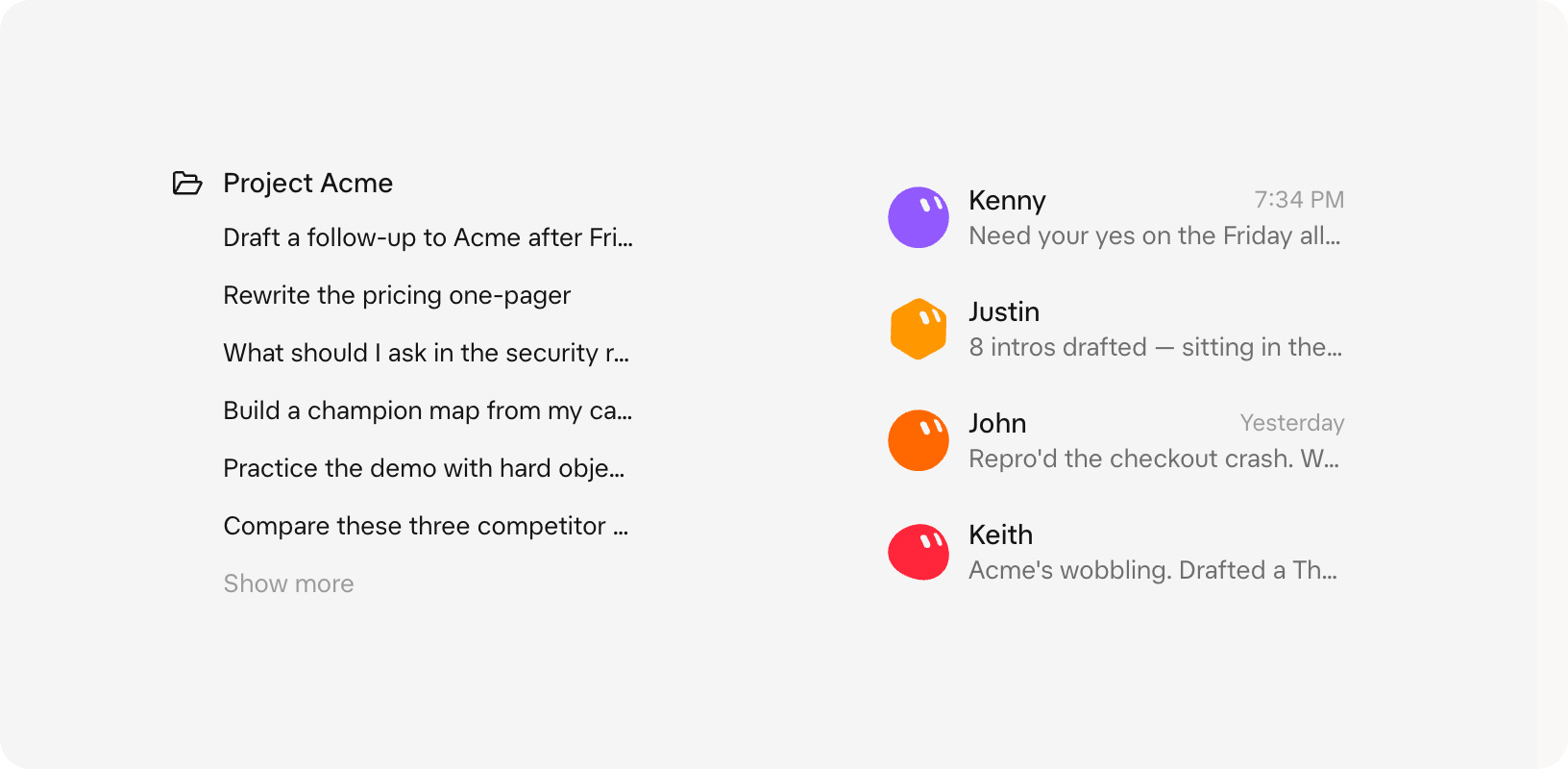
A Bot has:
A name, title, description, and avatar
A persistent conversation and learned context
Access to plugins, files, and a cloud computer
Skills that describe how to repeat a workflow
Routines that run a skill on a schedule or supported event
Approval gates for sensitive actions
There is one security detail hiding under the cheerful avatars: your Bots are separate coworkers, but they are not separate security zones.
SpaceXAI's documentation says all Bots on your account share one cloud computer. That means shared files, command-line credentials, browser sessions, and app logins can be available across the roster. Their conversations and memories are separate; their machine is not.
So do not create a "Finance Bot" and assume your "Meme Bot" cannot reach the same signed-in browser. Use scoped accounts, connect only what is needed, and sign out or revoke access when a job is finished.
This is also why the handoffs work. A Research Bot can save a brief in /workspace, a Writer can open it, and a Reviewer can check the same artifact without you downloading and uploading files between every step.
Grok Bot vs. Hermes, OpenClaw, and Paperclip
I need to compare Grok Bot with what I already use, because every agent looks revolutionary when you review it alone.
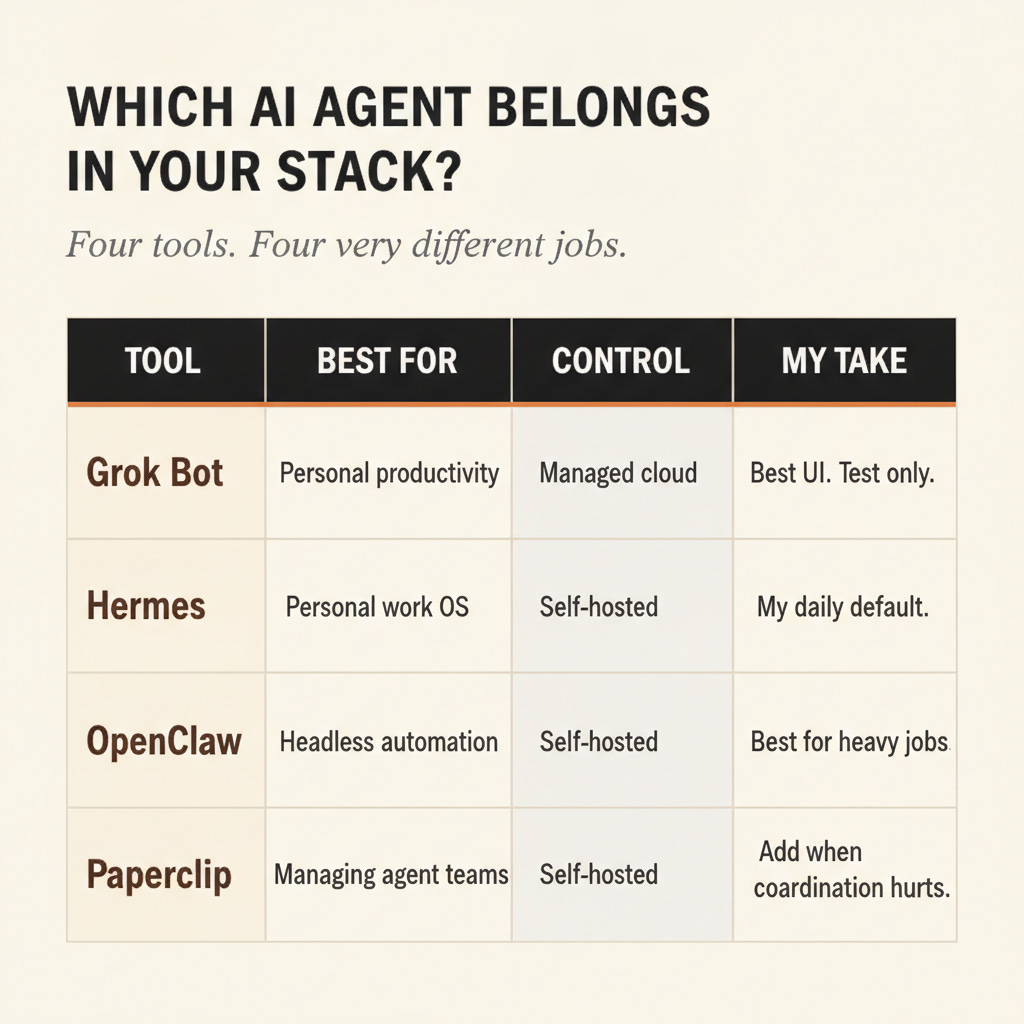
These four products overlap, but they sit at different layers:
Where I expected more from Grok:
Being native to the X platform so it can do deep research, outreach, and DMs inside the platform. Actually it has the same capabilities you can get with official or unofficial X APIs.
Grok Bot: the easiest front door
Grok Bot wins on packaging. I do not need to provision a server, wire Telegram, choose a model provider, or maintain a gateway before the first useful task. The computer, browser, plugins, routines, and approval UI are already together.
For a creator who has never touched a VPS, this matters more than another benchmark result. The fastest setup is the one you will actually finish.
The price of that convenience is control. The computer lives in someone else's cloud, usage comes in a weekly pool, and all Bots on the account share that machine. I would use it for bounded creator workflows before giving it the keys to an entire business.
Hermes: still my operator
Hermes now has its own Bot Mode with named specialists, separate memory, skills, routines, and group chats. That makes the comparison much closer than it was a few months ago.
I am still keeping Hermes at the center of my stack. It already knows my businesses, lives where I work in Telegram, lets me choose the model, and runs on infrastructure I control. Its learning loop can turn repeated work into reusable skills, which is a better fit for one personal operator that should improve over time.
Grok Bot is easier on day one. Hermes gives me more control on day 100.
I wrote the complete infrastructure, memory, Telegram, and migration setup in I Rebuilt My OpenClaw Setup on Hermes + GPT-5.5.
My decision rule
Starting from zero and want a useful Bot today: Grok Bot.
Building a long-term personal work OS across chat, memory, and business context: Hermes.
Need self-hosted flexibility, custom channels, or durable headless jobs: OpenClaw.
Already coordinating a real team of agents and need budgets plus governance: Paperclip.
I would not migrate my existing Hermes setup into Grok Bot. I would test Grok Bot on one contained workflow where its browser, X proximity, and polished routine interface give it an advantage.
For me, that workflow is creator research.
My personal filter: I do not need another agent that looks impressive in a demo. I need one that removes a repeated piece of work without making me rebuild the rest of my stack around it. Grok Bot earns a test because the browser, routines, and approval layer are already in one place.
Seven Real Grok Bot Workflows, Shown Through the Interface
The useful part of these examples is the operating pattern, not the person who posted it. I have removed creator identities and avoided personal screenshots. The numbers from public experiments are self-reported unless I say otherwise, so treat them as evidence of what happened once, not guaranteed ROI.
Before the cases, here is the mental model that makes the screenshots easier to read. A Grok Bot workflow normally appears in six places:
The Bot profile defines the role, outcome, and rules.
The conversation is the operating log: requests, checkpoints, questions, and results.
The computer panel shows the persistent cloud desktop while the Bot browses or uses apps.
Plugins connect structured systems such as Gmail, Calendar, Slack, Notion, Stripe, and support tools.
Routines schedule the same job or trigger it from an event.
Approval prompts stop sensitive actions until a human says yes.
The interface matters because the impressive result usually happens across all six. A prompt alone is not the product.
1. A $10,000 sponsorship negotiated in four hours
A creator connected a Grok Bot to the inbox where sponsorship requests arrive. Its job was not "manage my email." It had a much narrower commercial brief:
Reject spam and vague offers
Research the company and realistic market rates
Compare the request with the creator's rate card
Negotiate within an approved range
Keep a live list of each opportunity and the number on the table
Within four hours, the Bot reportedly closed its first sponsorship for $10,000.
How I would lay this out in Grok Bot: the creator opens a named Sponsorship Bot rather than a generic chat. The Gmail connection supplies the messages. In the center conversation, the Bot posts a compact opportunity card: brand, deliverables, deadline, inferred budget, rate-card match, risks, and recommended response. The human approves or edits the number. Only then does the Bot return to Gmail on its cloud computer, send the message, and update the deal tracker.
The approval moment is the whole design. I would configure three outcomes: reject automatically for obvious spam, draft and ask for legitimate negotiations, and never send when exclusivity, licensing, or unusual terms appear. For the first ten deals, I would require approval on every outbound message.
The interesting shift is not email automation. It is turning an inbox from a pile of unread messages into a revenue queue, while preserving a visible decision trail in the conversation.
My comment: This is the most seductive case and the one I would trust least on day one. A Bot can research rates and prepare leverage. My name, tone, and long-term relationship with a sponsor are still worth more than the time saved by one autonomous email.
2. Ten years of meetings became a 1,000-person CRM
Another operator connected a calendar and Notion, then asked the Bot to work backward through ten years of meetings.
For every real attendee, it created or updated a CRM record with name, meeting history, first and most recent contact, public profile, current role, relationship tags, industry tags, and a confidence score for uncertain matches. After 2.5 hours, the Bot had reportedly processed the first three years and created roughly 1,000 records.
How I would lay this out in Grok Bot: the conversation becomes a progress console. Instead of printing 1,000 contacts into chat, the Bot reports checkpoints such as 2016 complete: 284 events, 341 people, 29 records need review. The computer panel shows Calendar and Notion as it works. The actual artifact lives in Notion; the chat contains the decisions, exceptions, and links back to the relevant database view.
This is almost a perfect agent job. It is too large and boring for a human, valuable only when completed, and easy to divide into batches. It also exposes an important interface rule: make uncertainty visible. When two public profiles look plausible, the Bot should not guess silently. It should create the record with Low confidence, preserve both candidate URLs, and collect those rows in a review view.
A sensible first run would cover one month, stop after 50 people, and ask for approval of the schema. Once the fields and matching rules look right, the operator can resume the same conversation and let the cloud computer continue after the laptop closes.
My comment: I would genuinely run this workflow. Old calendars contain a map of your professional life, but only if the resulting CRM shows uncertainty instead of inventing certainty. The review queue is more important than the final record count.
3. A churn-recovery Bot paid for itself
A small software business gave one Bot a single target: recover customers who had cancelled during the previous six months.
It pulled the churn list, drafted short messages using each customer's real history, logged every reply, and reportedly brought several customers back. Then it analyzed the replies overnight and produced a five-step plan based on the reasons people left. The operator said the recovered subscriptions covered the cost of Grok Bot. No underlying revenue numbers were published, so I would not turn that into an ROI calculation.
How this maps to the Grok Bot interface: Stripe or the billing database supplies the cancellation cohort; the support system supplies tickets; Gmail supplies the outbound draft and replies. The Bot conversation first shows the proposed audience and exclusions. After approval, it reports sends and responses. A routine reruns the analysis overnight, while the result arrives as a chart and a short action plan in the same thread.
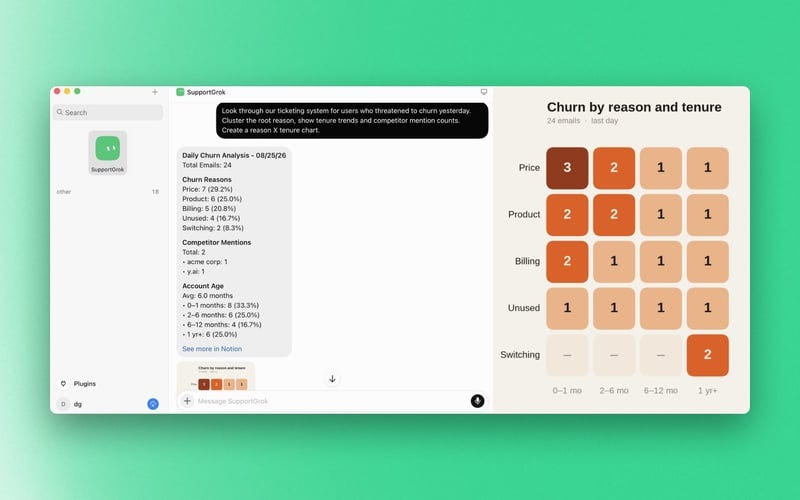
The complete loop is:
Find lost revenue -> exclude risky contacts -> draft outreach -> get approval -> recover customers -> classify replies -> improve the product.
This is much more defensible than a Bot whose goal is simply "send win-back emails." The analysis remains valuable even when a customer does not return.
My comment: This is the strongest commercial case here because failure still creates information. Even when the outreach recovers zero customers, the clustered reasons can change onboarding, pricing, or the product. That is a better bet than measuring the Bot only by messages sent.
4. A contractor turned browser paperwork into an operations desk
One contractor ran Grok Bot on live back-office jobs for two days. The Bot reportedly found a discrepancy in a subcontractor's insurance certificate, prepared the broker message, turned a customer contract into a work order and materials list, filled a supplier credit application, completed a city permit form, and booked an inspection through another online system.
How this maps to the Grok Bot interface: the left side remains the job conversation, while the computer panel is the live work surface. The Bot opens the PDF, extracts the project fields, moves into the supplier or city website, and fills the browser form. If it reaches a login, CAPTCHA, two-factor prompt, or ambiguous legal declaration, it hands control of the desktop to the contractor. After the contractor finishes that step, the Bot continues from the same screen.
This example demonstrates something connector-only automations cannot do well: one job can cross a PDF, an inbox, and three old websites with no shared API. The persistent computer carries the session state between them.
The safe interface pattern is prepare -> preview -> approve -> submit. The conversation should contain a final checklist with the customer name, address, permit type, fee, appointment time, and every field inferred rather than copied. The Bot can prepare the permit; the contractor still owns the declaration and final submission.
My comment: This is where browser agents stop feeling like toys. The work is not glamorous enough for a viral demo, but it is exactly the work a small business pays for with evenings and weekends. I would automate the transcription and navigation, then keep the signature and legal declaration human.
5. A 6,000-reader newsletter built its team around revenue
A solo local-newsletter operator used Grok Bot as an operating layer for a publication with roughly 6,000 readers.
The setup begins with a Chief of Staff Bot auditing the business and proposing the first three specialists most likely to increase revenue. A Sponsorship Bot watches the business inbox, keeps the available ad inventory and approved rate sheet current, and prepares sponsor conversations. Other specialists cover research, publishing systems, and coding.
The interface becomes more interesting here because work is no longer trapped in separate one-to-one chats. Grok Bot can create a channel for an outcome, then add the relevant specialists to its member list.
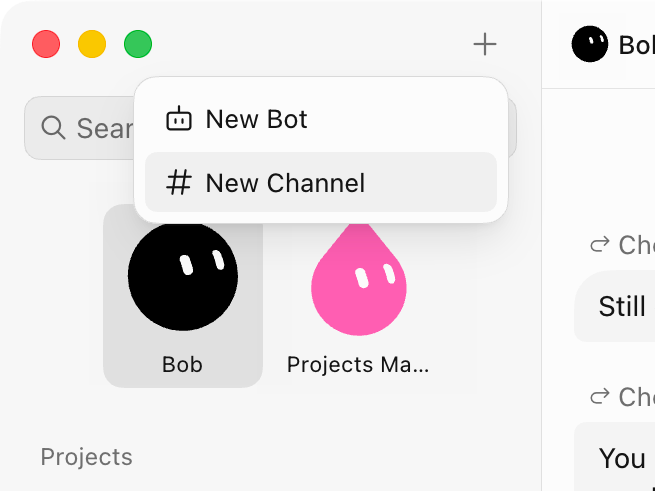
+ menu creates either another Bot or a shared channel. A channel is useful when the work has a handoff, such as Researcher -> Sponsorship -> Publisher.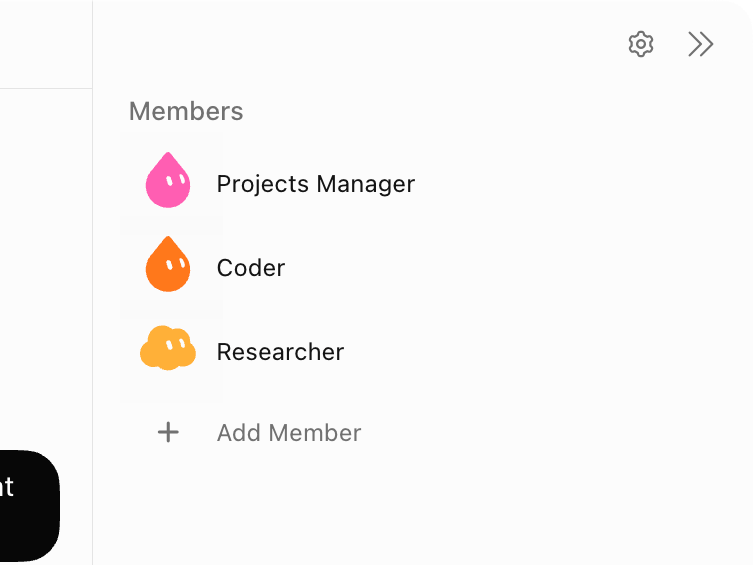
The part worth copying is the build order:
Run one revenue task manually with the main Bot.
Correct the process until the output is dependable.
Move only that proven task into a specialist Bot.
Put specialists in a channel only when a real handoff exists.
Schedule the workflow after the manual version works.
Keep publishing and commercial exceptions with the owner.
This is a better mental model than assembling an impressive-looking agent org chart. The roster should explain the work, not decorate it.
My comment: I would stop at three Bots for a newsletter: one researcher, one operator, and one reviewer. The moment two Bots have overlapping responsibility, I become their middle manager again. I learned that lesson the expensive way in my four-agent experiment.
6. An X bookmark became a working prototype before lunch
One official field workflow is unusually relevant for creators covering technology. Every weekday, a Tech Demos Bot scans saved X bookmarks, chooses one technology worth demonstrating, and drafts a prototype brief. It does not immediately start building.
The Bot first posts the candidate in chat with the original signal, why it matters, the proposed demo, required tools, and a build prompt. The operator edits the prompt and approves or denies it. After approval, the Bot starts a Cursor cloud agent. When the build finishes, it returns screenshots or a short clip and opens a pull request.
The profile behind this workflow is only three fields:
Name: Tech Demos
Title: Daily X tech scout
Description: Look at my bookmarks each weekday, pick one technology worth
demoing, draft a prompt in my style, wait for approve or deny, then start a
Cursor cloud agent. Return screenshots or a clip and the pull request.
What this looks like in Grok Bot: the recurring schedule appears under Routines; the morning proposal appears as a normal Bot message; approval happens in the same conversation; and the build runs in a specialized coding environment rather than polluting the research Bot with implementation context. The final message links the visual proof and code artifact.
My comment: This is the best creator case in the set because it closes the gap between interesting link and original demonstration. Most AI newsletters summarize the same launch. A scout that turns one saved post into something testable gives the writer firsthand evidence, screenshots, failure modes, and a much better article.
7. An overnight Chief of Staff prepared every meeting
A real enterprise workflow uses a Chief of Staff Bot to prepare the next day's meetings while the operator is offline. It can pull account history from Salesforce, recent email from Gmail, internal context from Slack, meeting notes from Granola or Gong, calendar details, and public research for a new prospect.
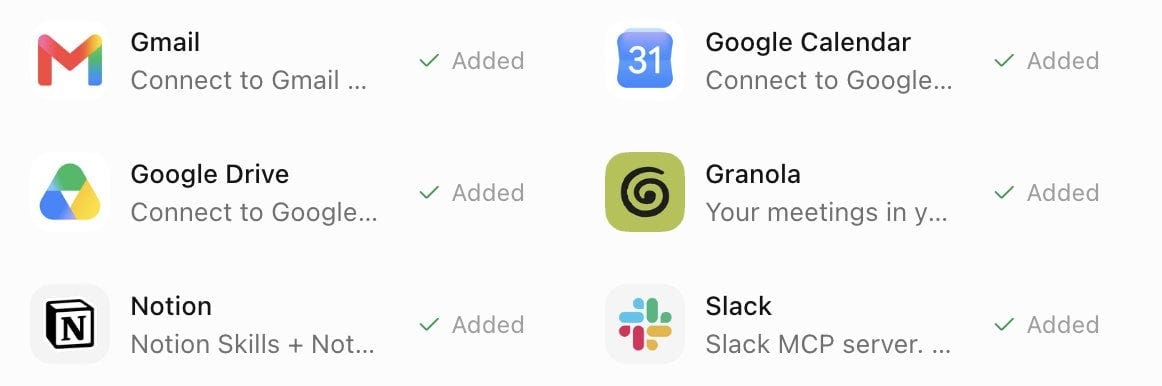
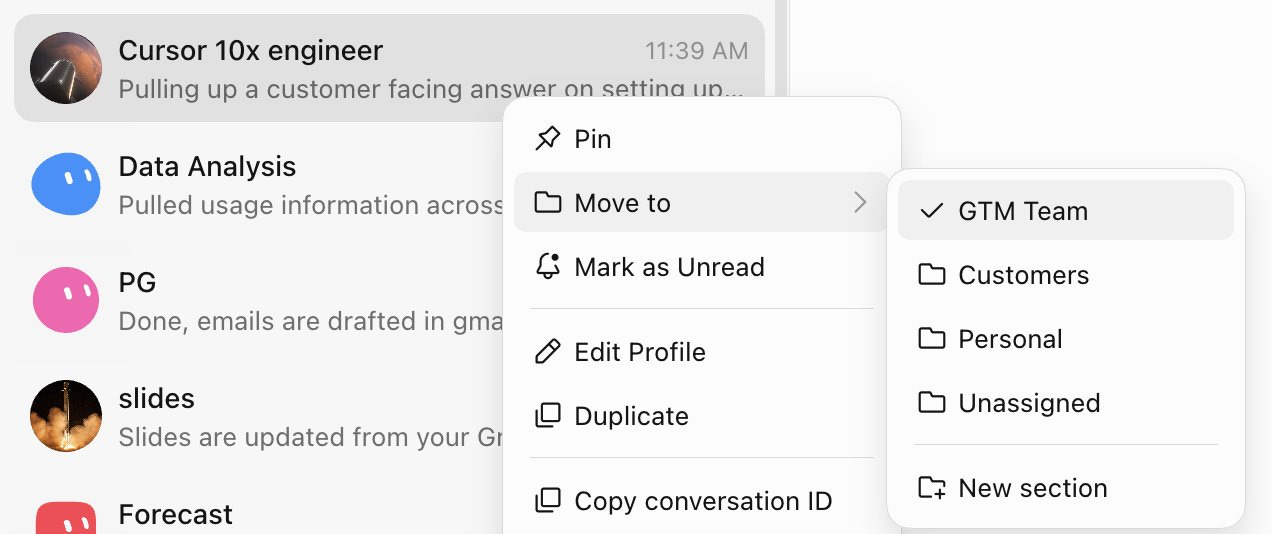
What this looks like in Grok Bot: each role appears as a named conversation in the sidebar. The operator can pin the Chief of Staff, group specialist Bots under a GTM section, and move a conversation when the workspace gets crowded.
The morning result should be phone-readable, not a research dump:
09:30 - New prospect
Goal: Confirm whether the support workflow is painful enough to fund this quarter.
Context: Hiring for support operations; two recent posts mention response time.
People: VP Support is economic buyer; RevOps lead owns the current process.
Ask: Get baseline ticket volume and cost of the current manual handoff.
Open loop: They requested security documentation last week; no reply logged.
For an existing customer, the same Bot can add open support tickets, recent usage changes, unresolved promises from the last call, and relevant product releases. A Slides Bot can prepare a deck, but sending email, changing CRM opportunity stages, or presenting commercial terms should remain approval-gated.
This is where Grok Bot starts to look less like chat and more like an operating surface: one conversation coordinates several systems, several specialist Bots, a schedule, and a human decision point.
My comment: Meeting preparation is not exciting, which is precisely why it belongs with a Bot. The output should not pretend to replace judgment on the call. It should make sure I arrive knowing what we promised, what changed, and which question matters.
These seven cases share one blueprint: one owned outcome, visible evidence, a persistent workspace, and explicit approval before consequence. That is the blueprint we will use below for a creator-research Bot.
Now Build It
You have seen the outcomes and the interface patterns. Below is the complete Creators' AI implementation: the Bot profile, source pack, research prompt, output contract, reusable skill, daily routine, approval policy, cost controls, and multi-Bot extension.
This is the part I would want beside me while setting up the Bot, so it is reserved for paid subscribers.
