


Hey,
Today I want to share a real story from an indie dev who built the game completely with AI and is launching it on Steam.
Twin is a solo indie developer shipping Captive 3000, a first-person sci-fi dungeon crawler in a retro Amiga / Atari ST style, to Steam on 6 November 2026. In this post, he walks us through the five-step AI toolchain he used to take it from pitch to a public build, with screenshots from the actual project.
At a Glance
In this piece, you will learn:
How to turn a one-sentence pitch into a story, a style bible, and a narrative skeleton you can build levels against
How to make game-ready art, faux-3D environments, music, and sound effects with a small set of AI tools
How to code with an AI model in the loop and hand off to a bot, while you still review everything that matters
This post is prepared with Guest Author — Twin, solo indie developer and creator of Captive 3000. If you also want to write for Creators AI — send me email here
You don’t need a studio, a custom engine, or a six-figure art budget to ship a complete game. You need a clear concept, a small set of AI tools, and the discipline to treat each tool as one step in a pipeline rather than a magic button. This is the end-to-end workflow I used. Every step is reproducible on a different project, including yours!
1. Plan the concept and story with Claude
Start with a one-sentence pitch, then push Claude for structure rather than finished prose. Ask for a setting, a handful of characters, the core conflict, and an outline you can build game levels against.
Keep the output short enough that you can pin it next to your editor. When the story drifts, feed Claude the current draft and ask it to flag contradictions between scenes, characters, and tone.
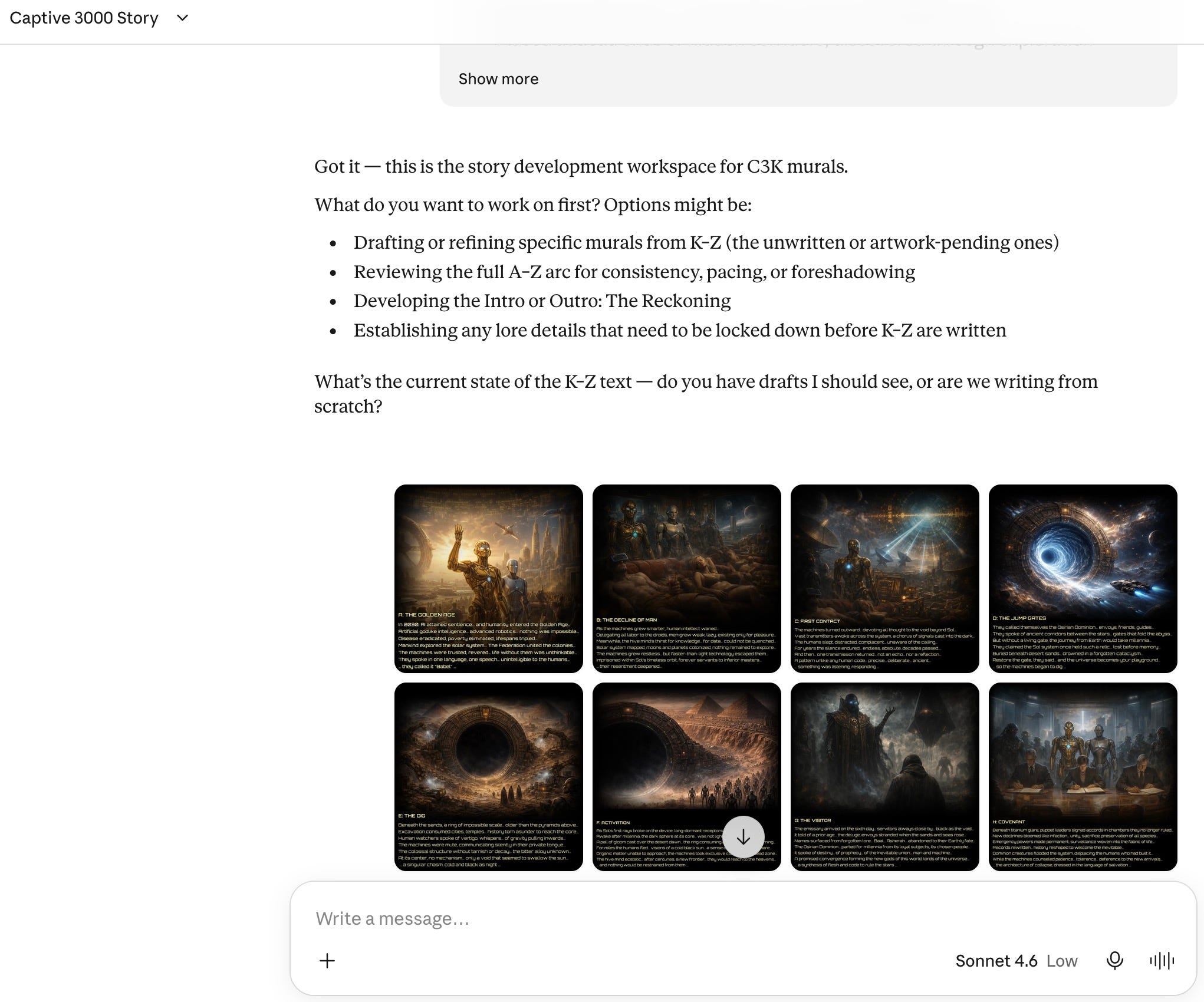
Lock a style bible early: what the world looks like, what it never does, and which emotions each area should push. The goal is a durable narrative skeleton you can ship against, not a novel.
Captive 3000 tells a dystopian tale of a prisoner waking from cryosleep on a forgotten moon after the fall of civilization, with no memory of their past. They use a terminal to control a remote droid on a distant planet, guiding it through the vastness of space to mount a rescue. Along the way, you discover your true identity and the fate of humanity.
The story is inspired by the original 1990 dungeon crawler game, Captive, but expanded upon and influenced by the dangers and benefits posed by modern advances in AI and robotics.
Example prompt:
I’m making a small first-person sci-fi dungeon crawler.
One-sentence pitch: [your pitch].

Give me:
1. A setting in 3 sentences.
2. Four main characters: name, role, one secret each.
3. The core conflict.
4. A 10-beat outline I can build levels against.

Keep it under 400 words. Then write a style bible: what the
world looks like, what it never does, and which emotion each
area should push.
This and many other practical posts on building with AI are available exclusively to our subscribers.
2. Create and animate the visuals
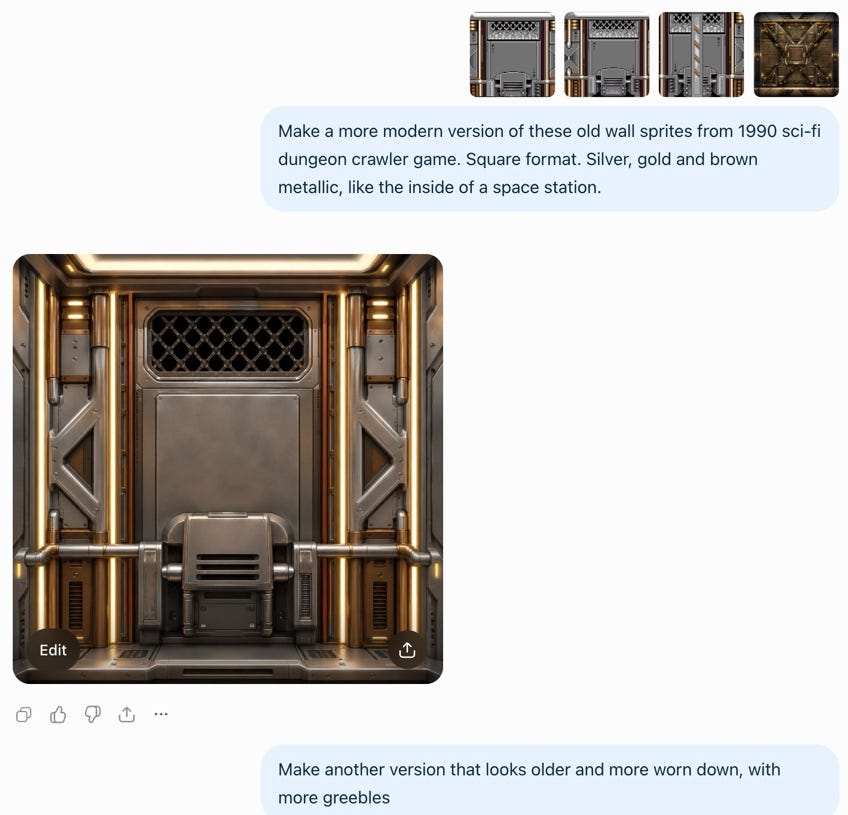
Generate stills in ChatGPT and Grok with a locked style sheet: palette, camera angle, lighting, and a hard list of things the image must never include. Produce more candidates than you need, then keep only the ones that match the sheet.
Animate selected frames in OpenArt for loops, idle cycles, and simple motion. Bring the keepers into Canva to clean edges, crop to engine sizes, and export game-ready assets.
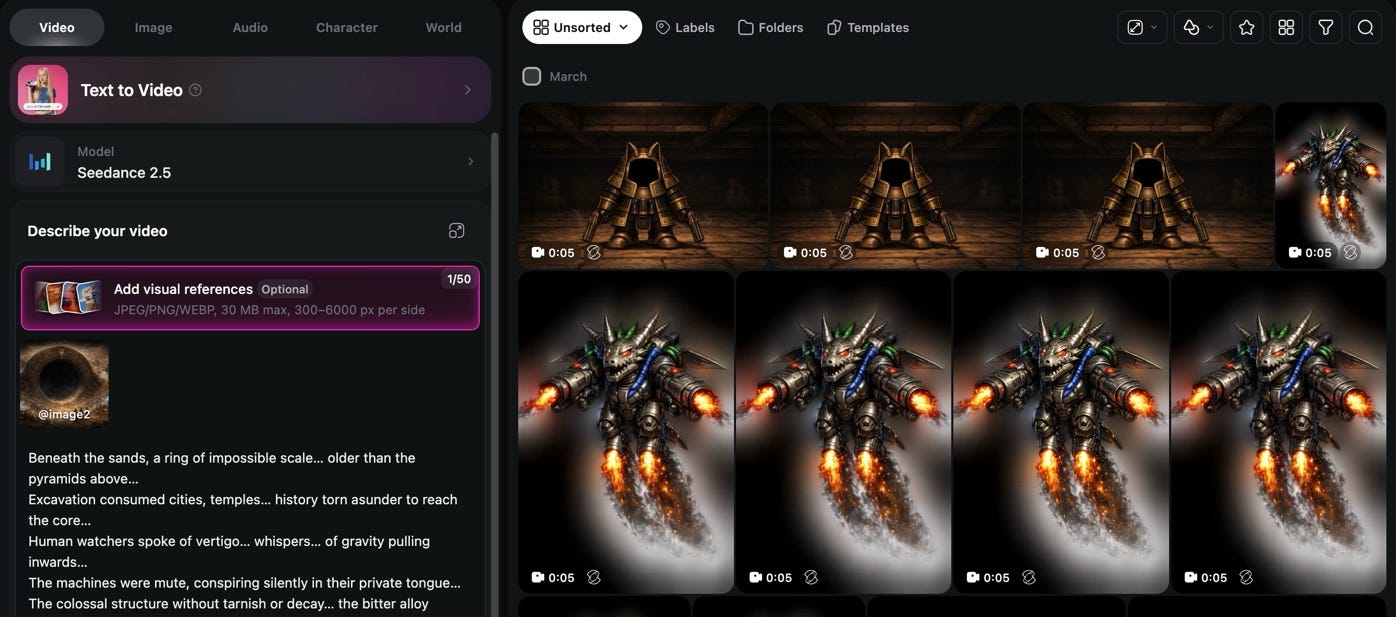
Treat generation as a volume filter and editing as the quality gate. If a batch drifts off-style, revise the prompt with a rejected example pasted in so the next run stays consistent.
Alternative versions of the prompts:
Make a more modern version of these old wall sprites from 1990
sci-fi dungeon crawler game. Square format. Silver, gold and
brown metallic, like the inside of a space station.
Make another version that looks older and more worn down, with
more greebles.Curious how far you can get without writing code at all? We built a game with Manus and walked through every step: Your First Game with Manus
3. Turn flat sprites into faux-3D environments
Flat sprites read as cardboard until you give them depth. Import wall, floor, and prop art into PowerPoint. Use 3D rotation and perspective transforms to tilt planes so corridors and rooms feel dimensional without a 3D modeler.
Compose a room once, duplicate it, and vary props and lighting rather than rebuilding from scratch. Export the composed scenes as images or spritesheets for the engine. This is the cheapest way I know to get a retro first-person look from 2D art, and it works for any grid-based or corridor-driven project.
Example prompt, image model:
Using this flat wall sprite as the reference, redraw the same
wall as seen from inside a corridor: left-side view,
perspective receding toward the back, same palette and
material. Keep the style identical. Plain background, square
format.
Example prompt, Cursor:
Our first-person view uses layered sprites at fixed distances
(D0 to D4). Write a function that takes one flat wall image
and renders it for each distance with the right perspective:
scale it down with distance, skew the left and right side
walls toward the vanishing point, and dim it with the shared
BRIGHTNESS value. Keep it small and testable, and show me the
diff before applying it.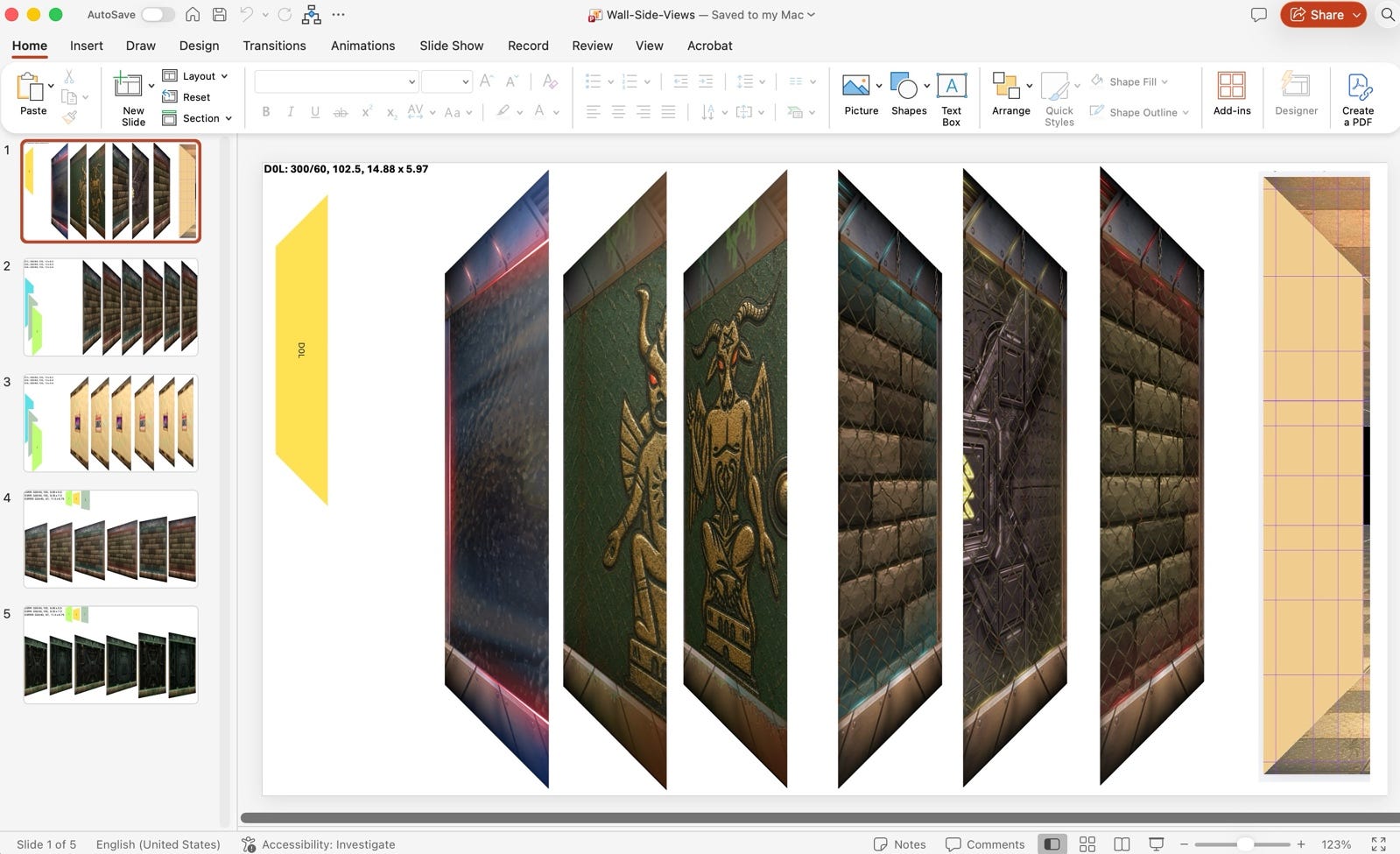
Editor’s note: Tilting each wall by hand in PowerPoint works, but it gets slow once you have dozens of walls. Two alternatives we would try:
Ask the image model to draw the wall already in perspective
Let the game do the perspective with a small script, since the sprites are layered at fixed distances
Keeping one visual style across dozens of assets is the hardest part of AI art. Here is how we approached it: Consistent AI Design Without Headaches: Recraft Review
4. Make the music and sound effects
Generate music beds and raw SFX in Suno from short mood prompts: tension, exploration, combat, menus. Keep takes that match the scene and discard the rest without attachment.
Open the keepers in Audacity: trim silence, normalize levels, fade edges, and layer impacts so they cut through the music instead of fighting it.
Name files by scene and intensity so the engine can find them later. Export loops and one-shots at a consistent sample rate and bit depth. Sound is where AI output most often feels unfinished; a few minutes of manual polish changes that.
Example prompts, Suno:
Tension:
Dark ambient sci-fi, slow evolving synth pads, low drone,
distant metallic echoes, retro Amiga tracker feel, 70 BPM, no
vocals, loopable
Exploration:
Atmospheric retro electronic, soft arpeggios, wide reverb,
lonely space-station mood, mid-tempo, no vocals, loopable
Combat:
Fast dark synthwave, driving bassline, aggressive
chiptune-style leads, 140 BPM, no vocals, loopable
Menu:
Short moody sci-fi theme, slow melody over warm pads, 8-bit
bells, no vocals, 30 seconds
Sound effect:
Short sound effect: heavy metal door sliding open inside a
space station, mechanical hiss, no music, 2 seconds
Share this with a builder who has a game idea and no studio.
5. Vibecode
Build in Cursor AI with Claude and Grok models in the loop. Describe systems in plain language (grid movement, real-time combat, inventory, save data), let the model propose code, then review every change yourself before you commit.
Actually you can do it with any AI agent, IDE, check my recent post about it:

Example prompts, Cursor:
Start every session with the dev notes:
Read the Dev Notes to understand the game. Then add [system]
following the existing structure.

Requirements: [2 or 3 bullets]. Do not touch unrelated files.
Show me the diff before applying it.
Adding a system (grid movement):
Add grid-based movement: forward, back, strafe left and right,
and 90-degree turns, one tile per step with a short animation.
Block movement into walls. Keep the logic separate from
rendering so it can be tested. Show me the diff before
applying it.
Fixing a bug:
Bug: [what happens]. Expected: [what should happen]. Steps to
reproduce: [steps]. Failing case: [paste the error or game
state]. Find the cause, propose the smallest fix, and explain
why it works before changing anything.
Use the chat to refactor and to hunt bugs with the failing case pasted in. Prefer small, testable diffs over large rewrites.
AI speeds the typing; you still own the product and the message.

6. GTM with AI
Well, you made the game. What’s next? GTM!
Twin also shared his prompts with Grok Bot, where he created a dedicated bot for reaching out to creators (That’s how we found and connected with us btw!)
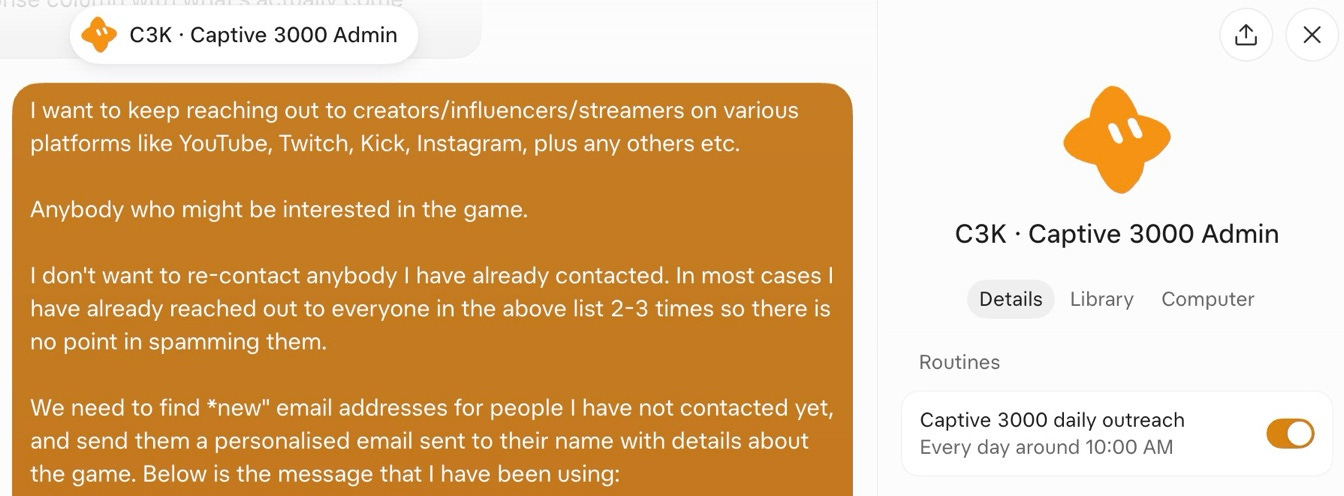
When the build is playable, hand off outreach to Grok Bot: press lists, email drafts, and follow-ups, with you approving anything that leaves the building.
Example prompt, a draft-for-approval version you can copy:
Every day at 10:00, find 10 new creators or streamers who
cover retro, dungeon-crawler or sci-fi games on YouTube,
Twitch, Kick or Instagram.

Skip anyone already in my contacted list. Find a public
contact email for each person.

For each one, write a short personalized email: one sentence
about a specific video or stream of theirs, one line about
[game name], the [Steam link] and the [press kit link].

Save the drafts for my review. Do not send anything. After I
approve a draft, add the person to the contacted list.
Coding with Cursor? These community hacks are worth stealing: Hacks for Vibe Coding with Cursor AI
Which step of this pipeline would save you the most time on your own project, and what would you build with it? Drop it in the comments.
Twin is a solo indie developer. Captive 3000 is his first-person, real-time, grid-based sci-fi dungeon crawler with roguelite and survival space-horror elements in a retro Amiga / Atari ST style.
It launches on Steam on 6 November 2026, with a free demo available now.
Twin used the toolchain described in this article to ship his project, and the same five steps will carry any small game from pitch to a public build.
The tools will change. The pipeline should not: plan, generate, shape, sound, ship.