


Hey!
GPT-6 Astra shipped this week — and within 48 hours, the internet figured out what it’s actually good for.
Not the benchmarks. Not the benchmark theater. The real stuff: what happens when you give a model full computer access and tell it to go solve something.
We went through hundreds of posts, threads, and demos to find the workflows that actually held up. Below are the eight use cases worth your attention — with sources for every claim.
At a Glance
In this post, you’ll learn:
What Astra can do that previous models couldn’t (computer use + long context)
8 real use cases from developers, designers, and creators
Which workflows are worth trying this week
What is GPT-6 Astra and what does it cost
GPT-6 Astra launched September 3, 2026. OpenAI calls it “the most intelligent and aligned model in the world.”
Pricing: $10 per million input tokens, $50 per million output, cached input at $1, batch at half price.
That’s 2.5x GPT-5.6 Sol’s current prices. OpenAI’s argument: Astra finishes many tasks in fewer tokens and fewer retries, which can offset the rate on a per-task basis.
Context window: 1,050,000 tokens, maximum output of 128,000 tokens.
Benchmarks: 72.6% on OSWorld 2.0 computer use at ~47% less time per task than Sol. FrontierMath Tier 4: 97.6%. ARC-AGI-3: 99.9%. On the Coding Agent Index, GPT-6 Astra equals Fable 5 at less than half the cost.
The key unlock vs previous models: full computer use — the model can operate interfaces directly, not just generate text.
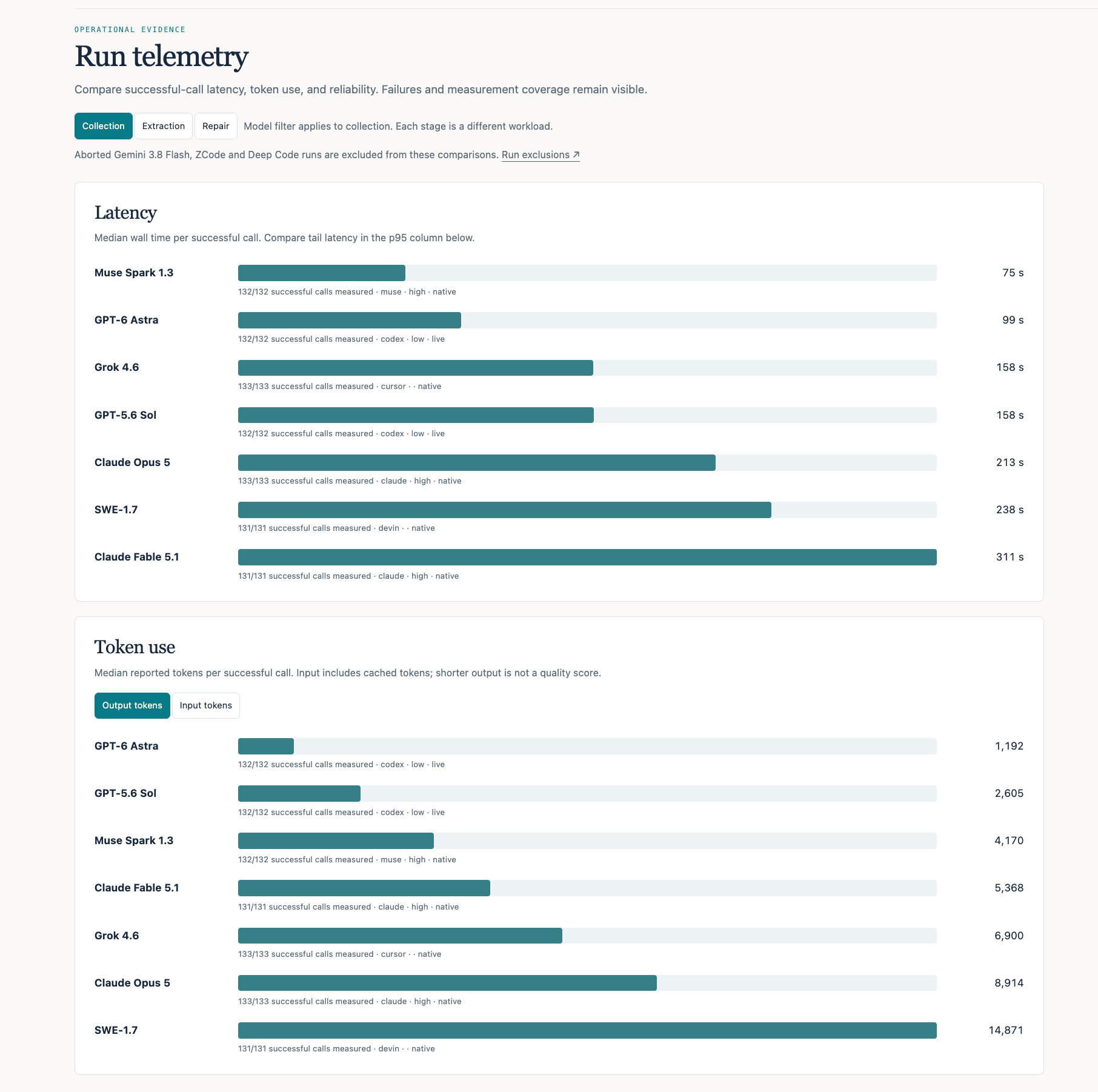
This and many other practical posts on building with AI are available exclusively to our subscribers.
1. Clean up your codebase 🧹
Theo (t3.gg) left Astra running overnight — it shipped over 40 performance improvement PRs. No manual prompt loop. No supervision.
Here is the result:
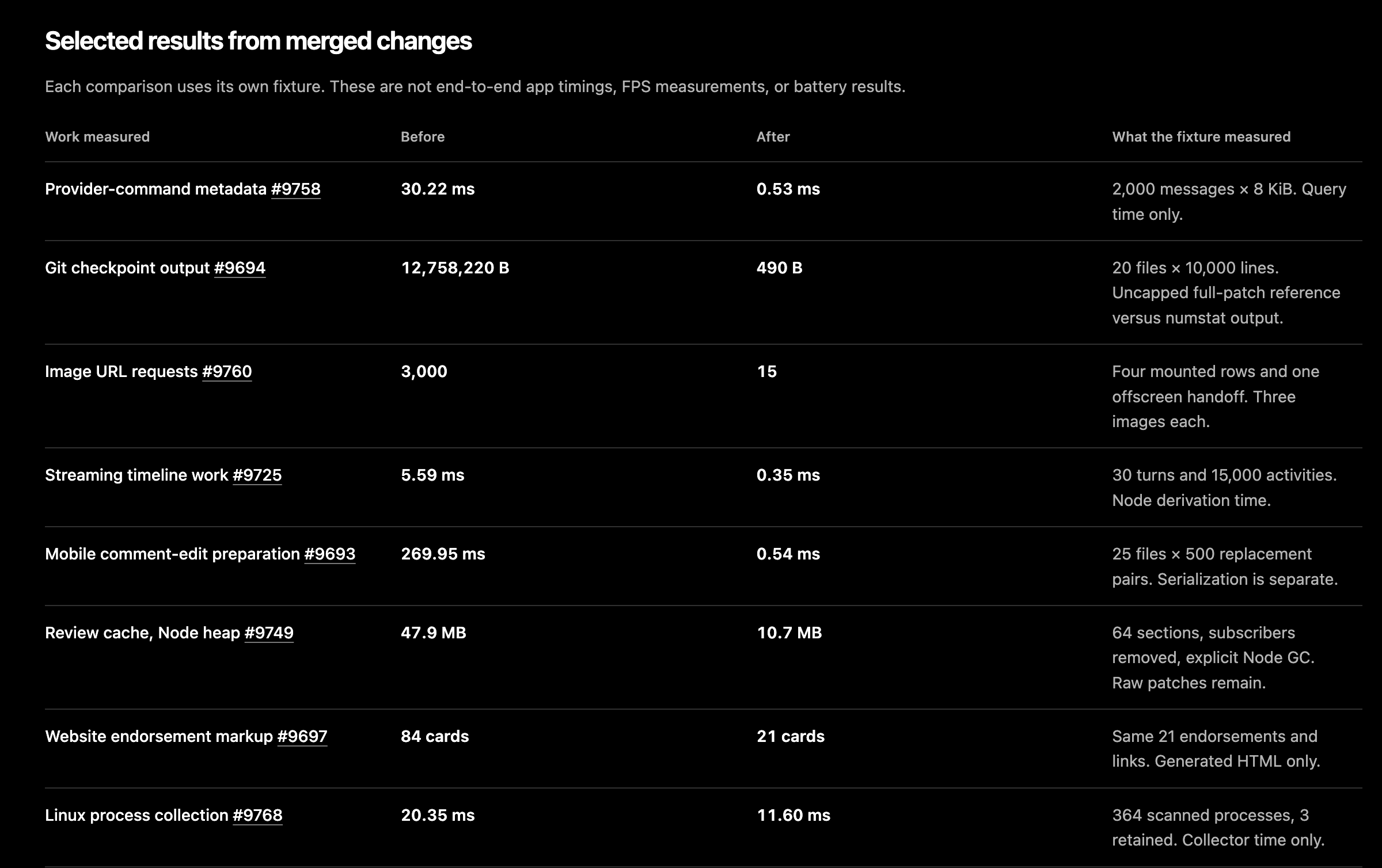
Here’s exactly how he uses it for slop audits:
Prompt that works:
“Go through my entire codebase hunting for slop — useless tests, unnecessary function wrappers, dead code. Remove them, run the tests, and verify nothing broke.”
Key tip from Theo: always give it the tools it needs to verify its own changes — debug access, test runner, end-to-end QA flow. Then ask Astra itself: “What do you need to verify your own work?”
Bonus: if you have an old branch or PR where agents have been running in circles for months, tell Astra to take it over. Let it know it can throw away existing work and start from scratch.
(Note from Theo: “I cannot be held responsible for surprise bills — limit usage.”)

2. Build 3D from references 🎨

Feed Astra reference images — a mood board, a product photo, a sketch — and it generates 3D models, rigs, and animations. One demo showed a full interior walkthrough built from a single reference board.
Vatroslav Vrbanić gave Astra 5 AI-generated reference images and one blueprint — and got a fully rigged 3D mech with a 10-second animation. MacBook M3 Pro, 46 minutes including video render. The model added sound on its own — nobody asked for it.
Astra replied: “I’ll choose the strongest reference for each part: front and elevated views for armor shapes, rear view for backpack and actuators, side view for joint depth and blade clearance.” — and went to work.
Stack: Codex Desktop App + GPT-6 Astra Extra High + Blender 5.2.1 headless
Exact prompt (Goal):
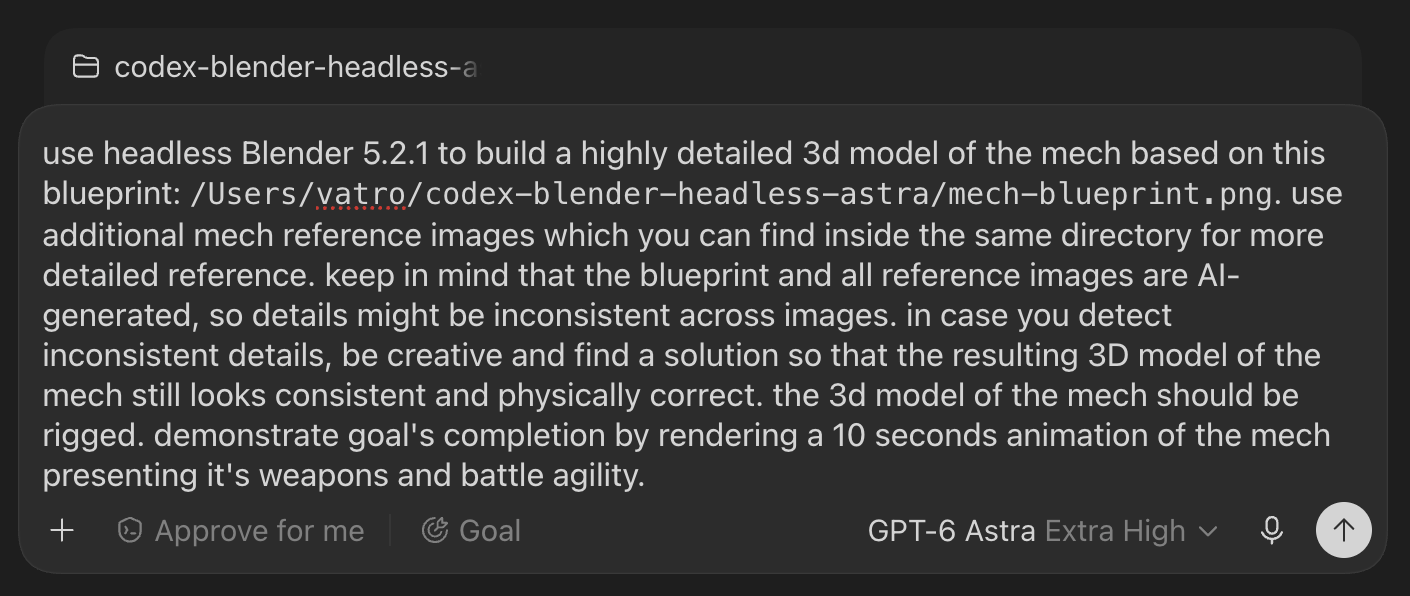
The only manual steering:
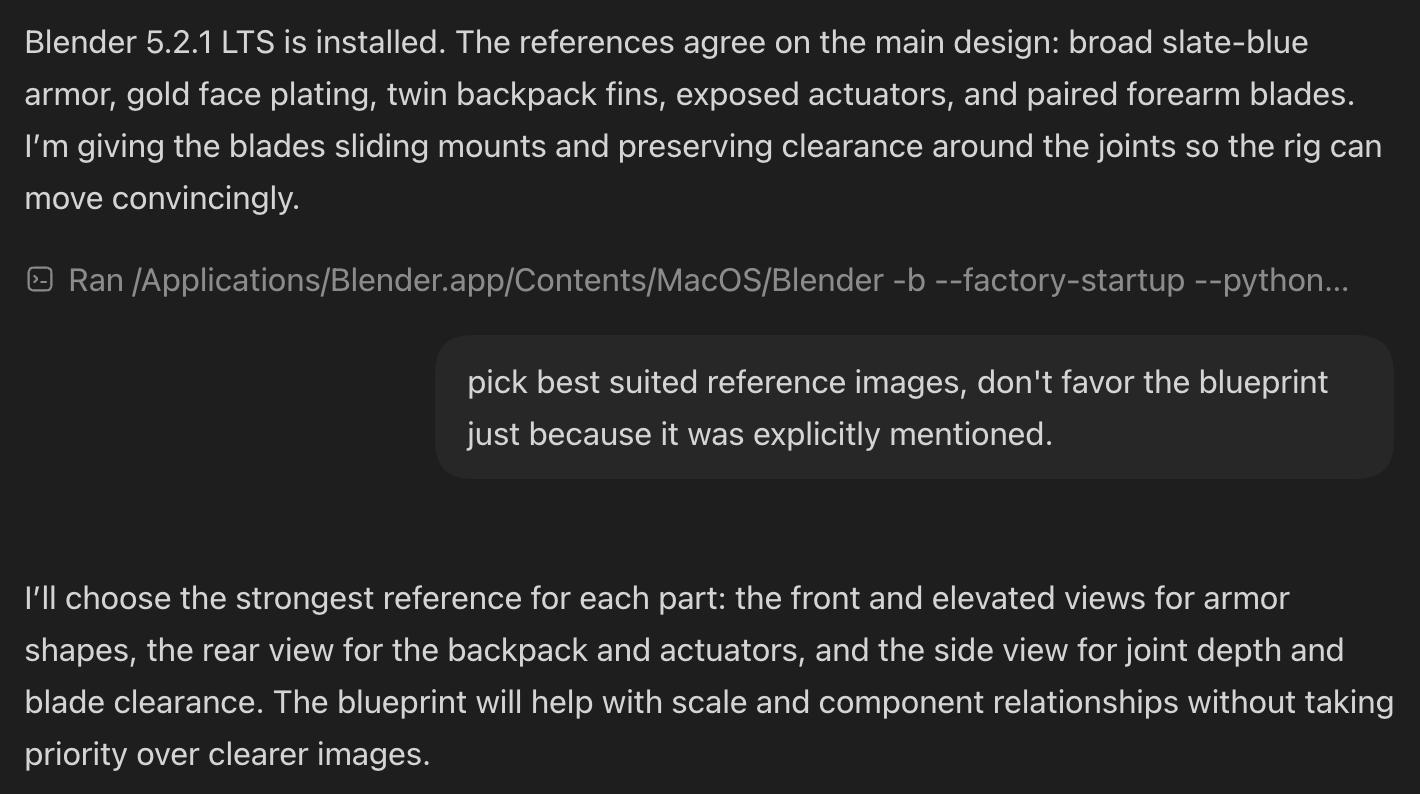
For indie game devs and motion designers: this is the biggest unlock in the whole list.
3. One-shot simple iOS apps 📱
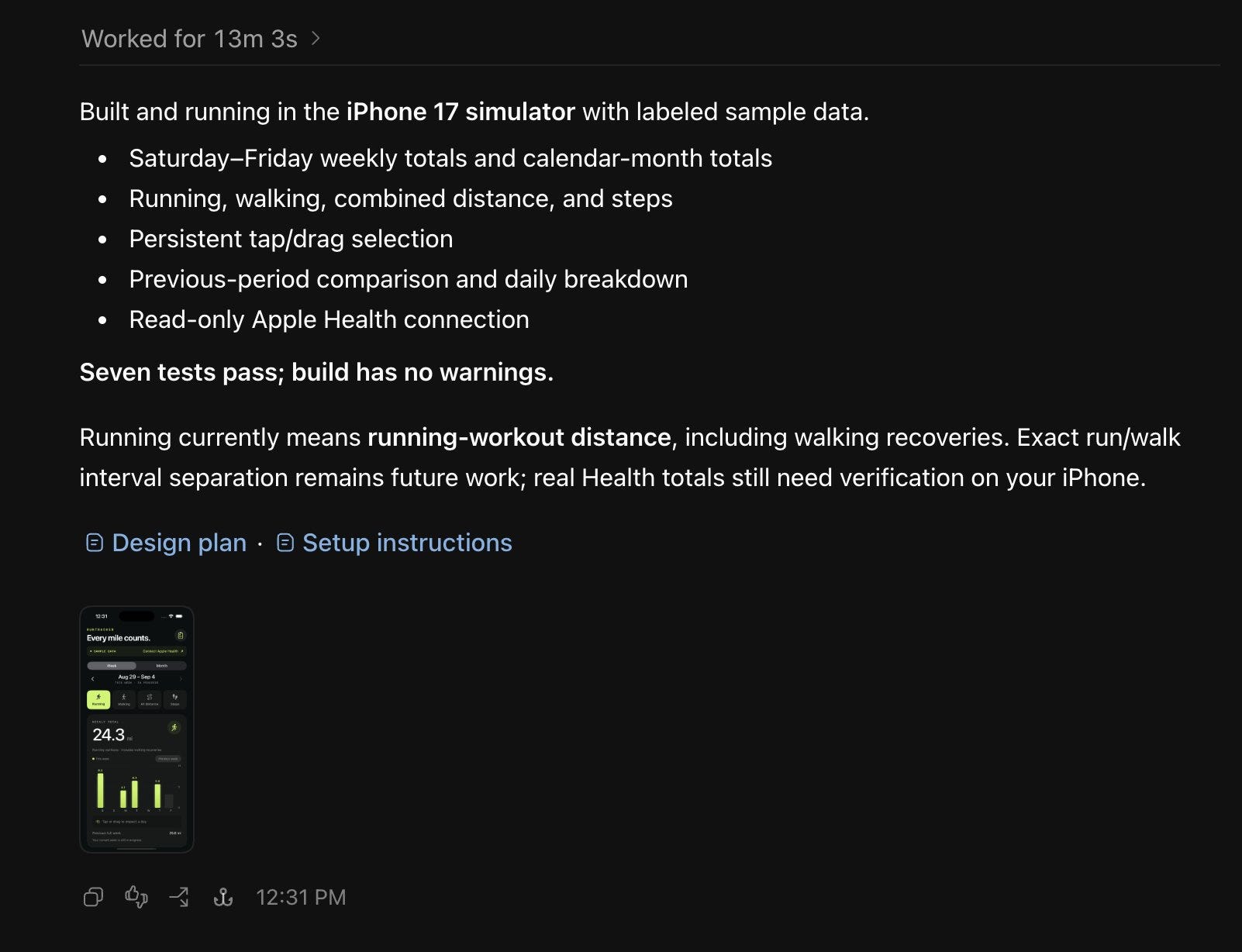
Paul Solt built a working iOS app in 13 minutes 3 seconds. The app pulls weekly mileage from Apple Health — something the native Health app doesn’t show easily. One prompt, no corrections.
What he used:
Codex Desktop + GPT-6 Astra on Light thinking (not Ultra — Paul’s tip: start with Light, it’s faster and good enough for most app builds)
His AppCreator skill — makes Xcode agent-friendly via Makefiles so Astra can build and run the app directly from Terminal
How the workflow feels: Astra writes better iOS code on the first attempt than previous models. With Sol, the model kept correcting itself — frustrating iteration. With Astra on Light, it builds and runs directly to the iPhone between turns.
Paul’s key tip: “Start with Light thinking. During early access I played a lot with Ultra, but it was slow. Light is the right default.”
Honest caveat (from the comments):
“The first run always looks clean. HealthKit is where I’d actually probe this — first prompt nails the UI, second prompt usually reveals it was reading cached samples the whole time, not live data.
4. Reverse-engineer hardware protocols 🔌
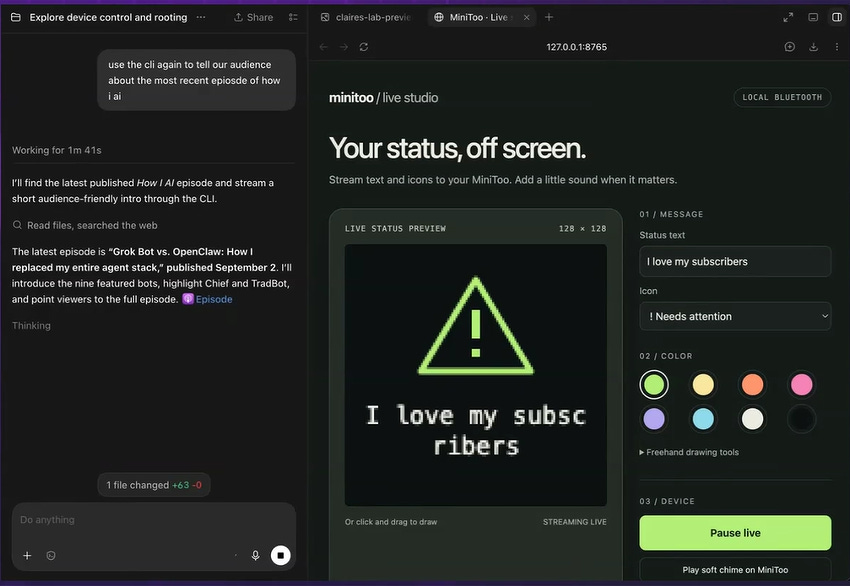
Claire Vo (ChatPRD) had been trying to hack the Divoom MiniToo — a Bluetooth speaker with a pixel display and zero public API — for months. GPT-5.5 got her to “say hi.” Astra finally cracked it completely.
What Astra built:
Reverse-engineered the proprietary Bluetooth protocol — no documentation, no API
Built a live drawing app: Claire can draw on the device using her mouse in real time
Built a CLI that lets the device stream live messages — Astra fetches the latest podcast episode and streams it to the pixel display automatically
Hooked the device into Codex hooks — it now notifies Claire when Codex needs attention
How it works:
Give Astra access to the device + a description of what you want it to do. It figures out the pixel algorithm, reverse-engineers the protocol, and builds the control layer. Claire’s only job was pointing it at the hardware.
Claire’s take: “It took me forever to get this thing to say hi with previous models. Now I can truly do anything I want on this.”
5. Prep footage for Final Cut
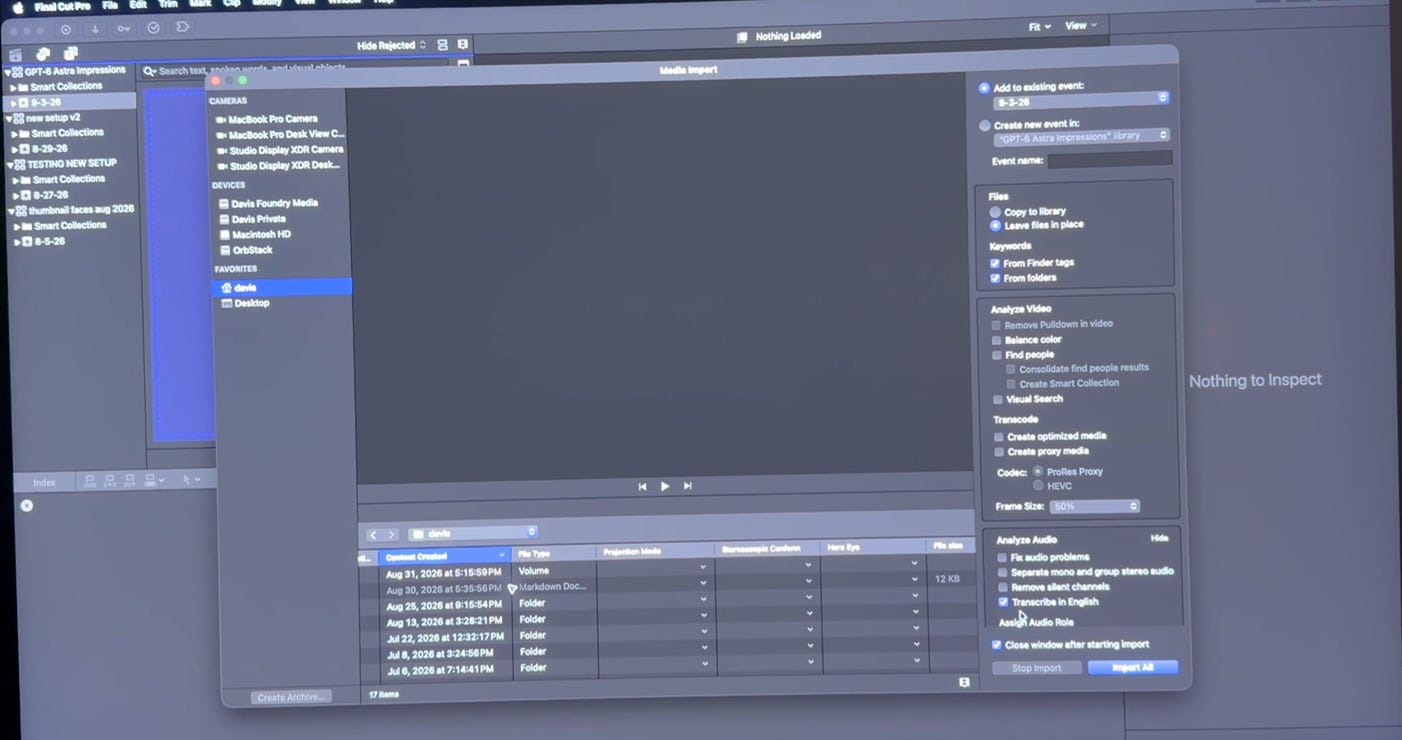
Ben Davis asked Astra to set up a freshly recorded video in Final Cut Pro — import clips, color grade, sync audio, create compound clips, set up multicam. His editor watched live. The reaction in the video says everything.
What Astra did without being asked:
Created a separate assets folder (so clips stay independent from the library — easy to share with an editor)
Built compound clips and set up multicam angle view automatically
Applied color grading — pulled audio from the correct source clip
Set up the project structure correctly, unprompted
The prompt Ben used:
“Set up the vid I just recorded in Final Cut — import clips, color grading, sync clips, etc. — to get ready to edit.”
That’s it. One sentence.
Ben’s editor live reaction (from transcript):
“I don’t know what the hell it got up to, but it just... it’s graded.”
“It’s not even at max thinking. This is high reasoning.”
“That was more than I expected. This model is really good.”
Extra: the reaction clip you see in the tweet — captions and all — was edited entirely by Astra.
6. Produce a track in Ableton 🎵
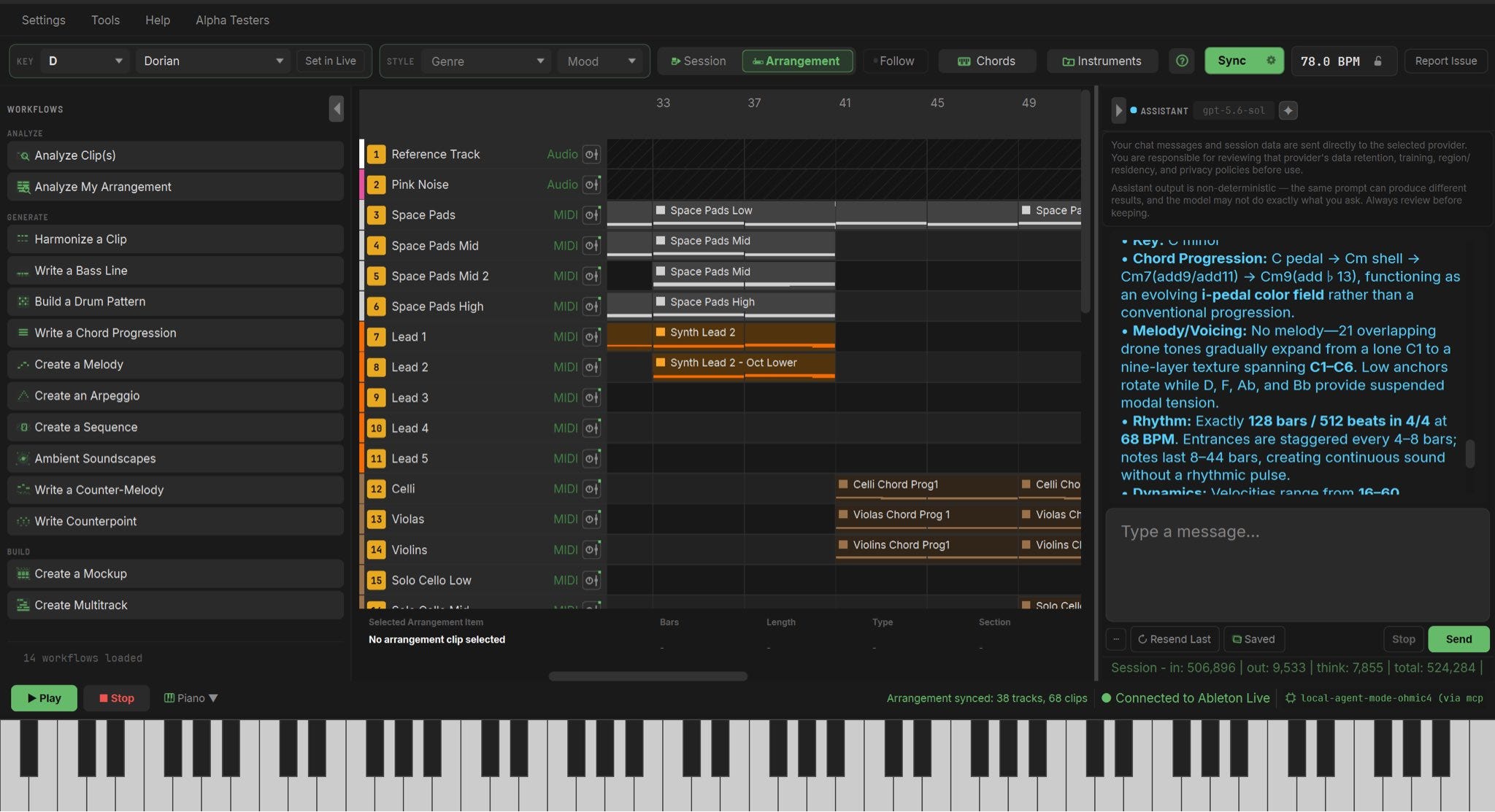
Pietro Schirano gave Astra access to Ableton via MCP — and got a full track back. Every instrument built with synths from scratch, all parts and arrangement included.
How it works:
Connect Ableton to Astra via MCP server
Describe the track you want — genre, mood, instrumentation
Astra writes the instruments in code, builds the arrangement, and outputs a finished track
Pietro’s exact words:
“I gave it access to Ableton via MCP and it made this track from scratch, creating each instrument with synths, along with all the parts and arrangement.”
Pietro is a design-forward founder — this was test #6 in a thread about what Astra could do in one session. The music quality will depend heavily on how specific your prompt is.
7. Turn a book into a reading site, EPUB, and audio 📚
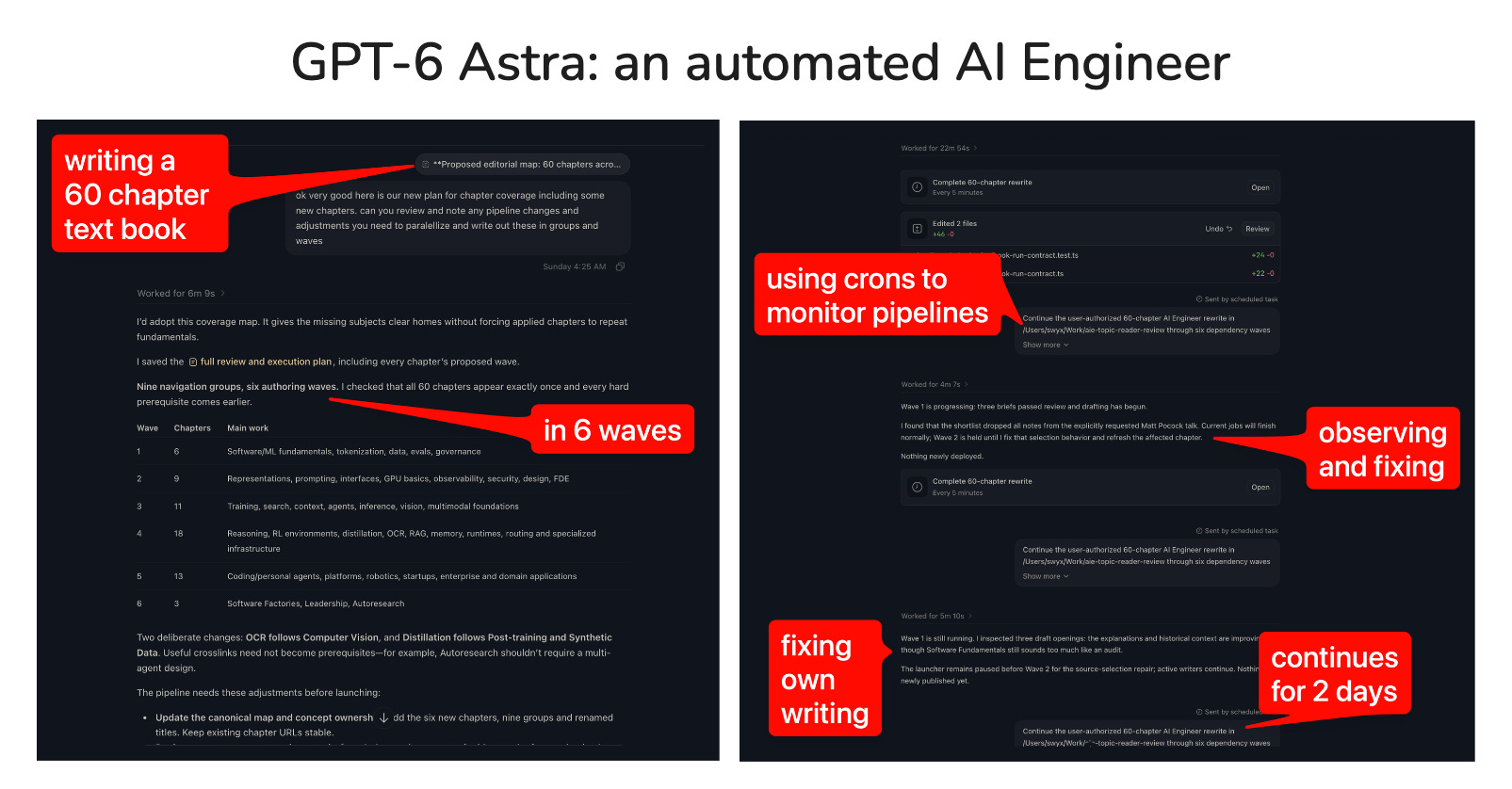
Swyx (founder of Latent.Space) used Astra to republish his book Learn in Public — fully redesigned, with a synced audiobook and printed physical editions. One input, multiple formats.
What Astra produced:
Web reader at learninpublic.org with synchronized text highlighting
EPUB for e-readers
Audio version with text synced to the narration
Physical print edition
How it works:
Give Astra the manuscript and tell it what formats you need. It handles the conversion pipeline, builds the web reader, generates audio narration, and syncs everything. For a book that previously required a production team and months of work.
The context: Latent.Space burned over 20 billion tokens of Astra testing it on real tasks. Their conclusion: “GPT-6 Astra is one of a new class of models that are fully capable AI Engineers in their own right.”
Cost benchmark from their testing: ~$6/hour equivalent at 33 tokens/second on High thinking mode.
8. Debug your app by having Astra use it 🐛
Claire Vo gave Astra browser access to her app and told it to use it like a real user. It found bugs she hadn’t caught — and fixed them.
Two real examples from her session:
Example 1 — CRM workflow builder
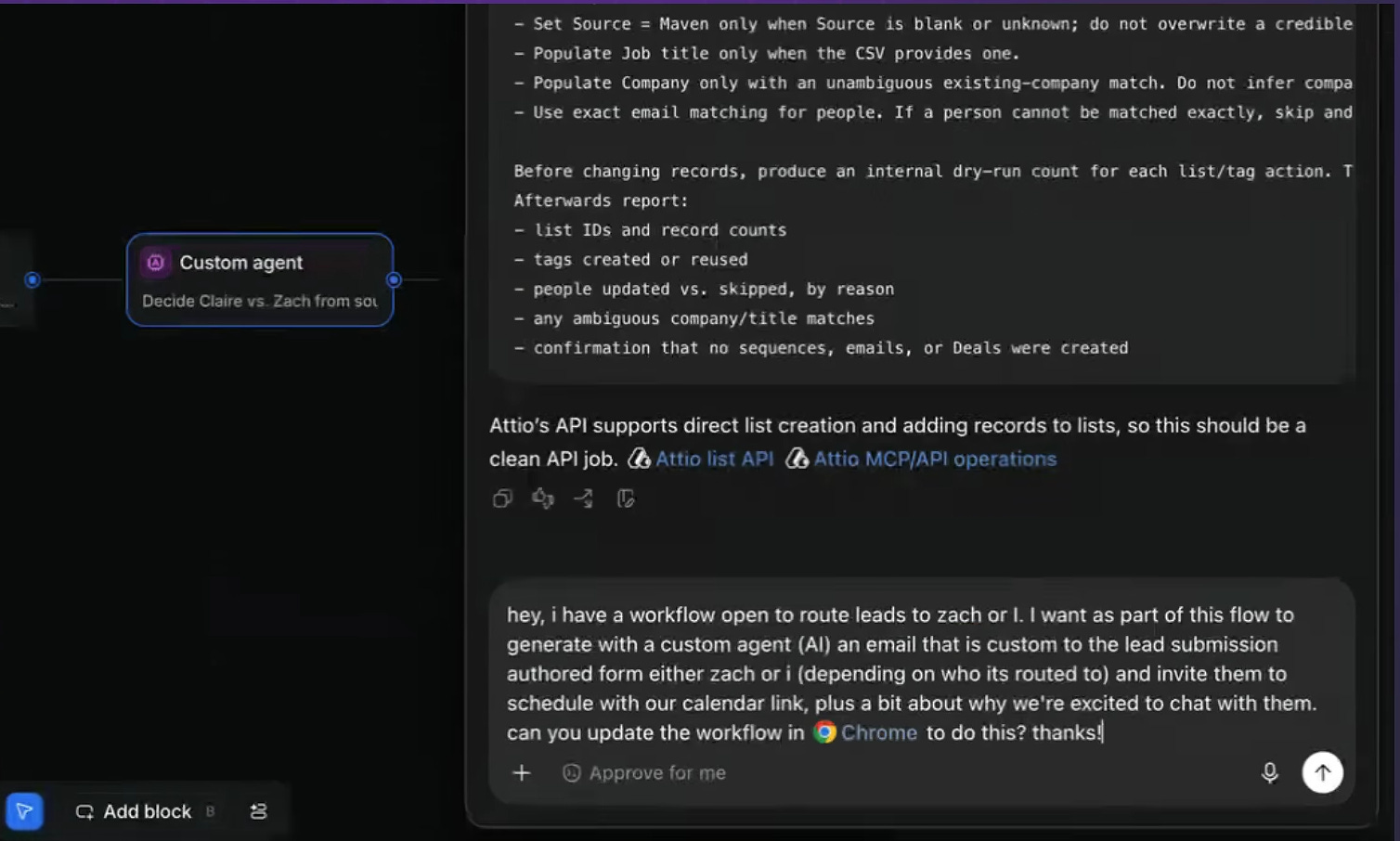
:Claire was spending an hour manually dragging nodes in her CXO.dev CRM trying to build a lead routing workflow. She gave up and handed it to Astra:
“I have a workflow open to route leads to Zach or I. I want as part of this flow to generate with a custom AI agent an email that is custom to the lead submission, authored from either Zach or I depending on who it’s routed to, and invite them to schedule with our calendar link plus a bit about why we’re excited to chat with them. Can you update the workflow in Chrome to this?”
Astra opened Chrome, took over the interface, built new nodes, new logic, and new prompts — clicking through a complex node-based UI the way a human would.
Example 2 — App QA
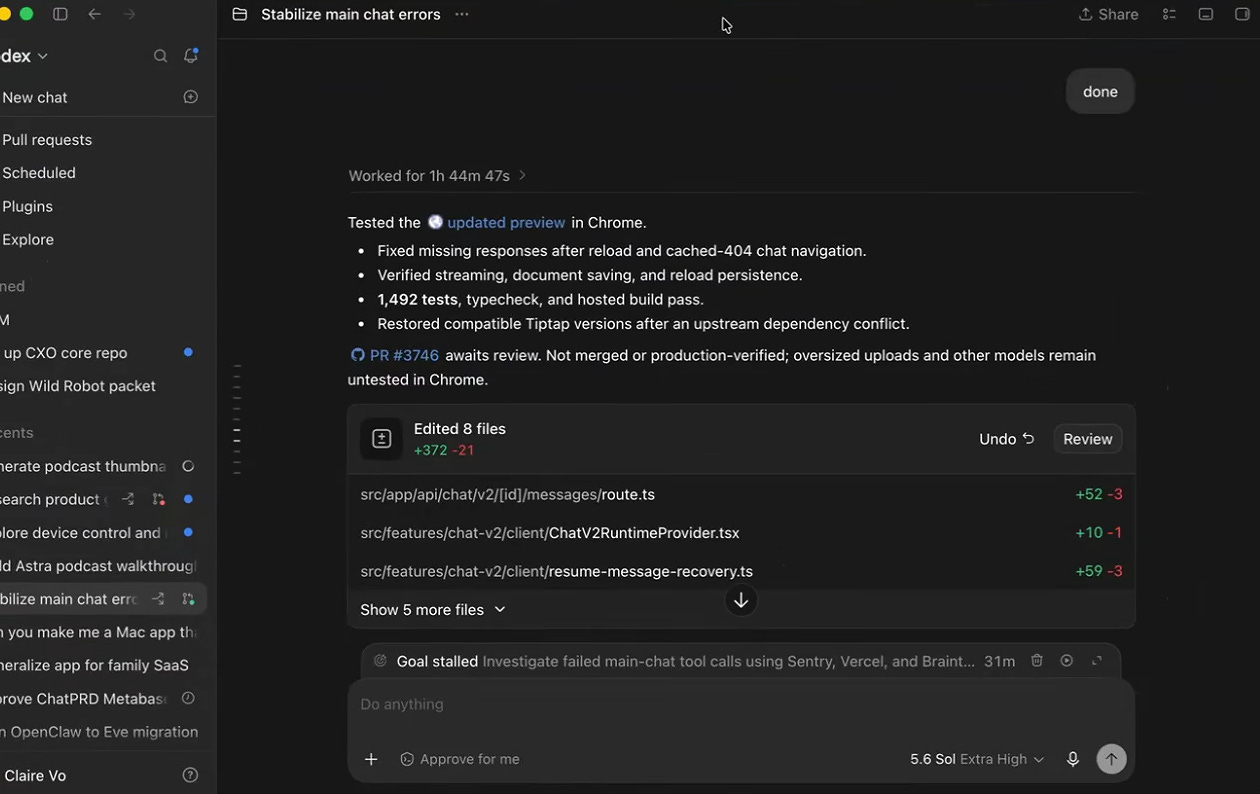
:Astra found race conditions in Claire’s ChatPRD app that she hadn’t spotted. It didn’t just report them — it fixed them in the same session.
“If you are not using browser use for QA, please do.” — Claire Vo
How it works:
Give Astra browser access via Codex Desktop
Tell it to use the app like a real user would
It navigates the UI, finds broken states, reports by severity, and fixes what it can
Key tip: works best on specific flows, not “test everything.” Example: “Use the messaging flow and check that messages send and history saves correctly.”
Before we get to the pattern — if you haven’t set up proper delegation workflows yet, this is the foundation: How To Make Complex Tasks with AI Agents
The pattern across all eight
These aren’t prompts. They’re delegations.
The shift with Astra is that you stop describing what you want and start handing over the job. The model navigates interfaces, runs code, checks outputs, and loops until the task is done.
What separates the workflows that work from the ones that don’t: a clear finish line. “Fix the bugs in my messaging flow” works. “Make my app better” doesn’t.
The best Astra tasks have three things in common:
A specific output you can verify
Multiple steps that would bore a human
Interfaces the model can actually access
If your task has all three, it’s worth trying this week.
The computer-use shift Astra makes is similar to what Claude Code already does for dev workflows — here’s how builders are using it: How Claude Code Can Be Your AI Teammate
What we’re watching
The computer-use capability is the unlock — not the raw intelligence. Models have been smart enough to do most of this for months. What changed is that Astra can actually sit down at the keyboard.
The question now isn’t whether AI can do these things. It’s how fast your workflow adapts to having a model that can.
We’ll be covering the best new Astra workflows as they emerge. If you’ve tried something that worked — drop it in the comments.
Share this with someone who’s still treating AI as a chat tool, not a coworker.
Also worth reading: GPT-6 Astra, Claude Fable 5.1, OpenAI Drops Cursor — our weekly digest covering the full Astra launch
Which of these eight workflows are you trying first? Drop it in the comments.
So useful!