

Hello folks!
🚨 Code Red Alert! The latest Creators’ AI Edition is out.
We’re not OpenAI, of course, but we can still break down GPT‑5.2, how Claude Code flexes in Slack, and Photoshop & Acrobat landing inside ChatGPT.
But let’s get everything in order.
Featured Materials 🎟️
News of the week 🌍
Useful tools ⚒️
Weekly Guides 📕
AI Meme of the Week 🤡
AI Tweet of the Week 🐦
(Bonus) Materials 🎁
Featured Materials 🎟️
OpenAI just dropped GPT‑5.2
Hardly a month has passed, and ChatGPT is upgrading again.
Remember how I mentioned the so‑called “code red” that the company announced in response to the recent Google Gemini 3 update? Well, it looks like all of this is happening as part of that. The developers are calling GPT-5.2 their “best model yet for real-world, professional use”. Essentially, they are their strongest model so far for serious scientific work.
GPT‑5.2 comes in with:
Instant – the fast mode for everyday stuff: info lookup, writing, translations
Thinking – for heavy-duty work: coding, analyzing long docs, math, planning
Pro – top-notch quality and reliability for the toughest tasks
Let’s get into the details:
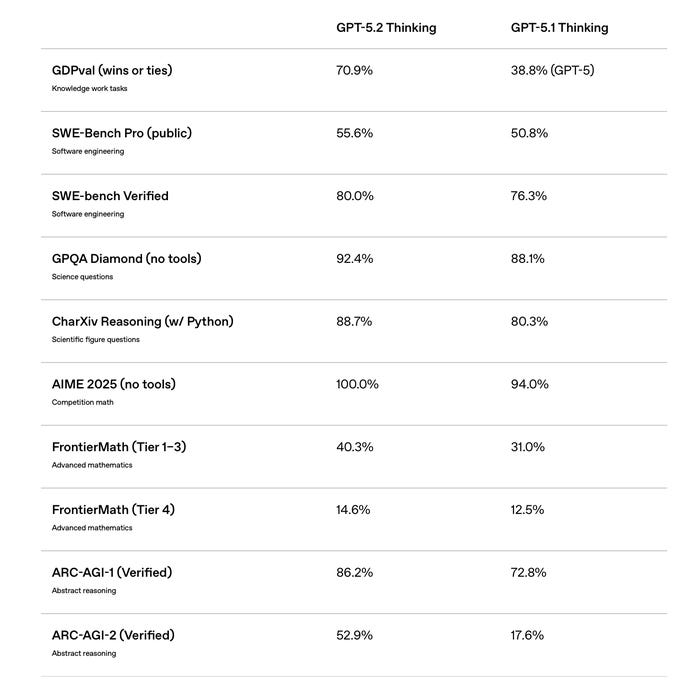
GPT‑5.2 is setting a new baseline in a bunch of benchmarks, including GDPval, where it beats industry pros on clearly defined intellectual tasks covering 44 different jobs.
On the GPQA Diamond benchmark (that’s the one with grad-level questions you can’t just Google), GPT‑5.2 Pro achieves 93.2%, followed closely by GPT‑5.2 Thinking at 92.4%.
On FrontierMath, GPT‑5.2 Thinking solves 40.3% of expert-level problems (a new all-time high). It also makes a massive jump on ARC-AGI-2, scoring 52.9% (almost double Gemini 3 Pro and far ahead of Claude Opus 4.5).
On the Tau2-bench Telecom (telecom tool-use test), GPT‑5.2 hits 98.7% success in using tools correctly.
It gets visual stuff more reliably. Actually, the model is way better at cranking out spreadsheets, building presentations, writing code, processing images, handling long context, using tools, and juggling complex projects.
GPT‑5.2 is available in ChatGPT for Plus, Pro, Business, and Enterprise subscribers. In the API, you’ll find it as gpt-5.2 and gpt-5.2-chat-latest, with the most powerful version called gpt-5.2-pro.
Pricing in the API:
Input: $1.75 per million tokens
Output: $14 per million tokens
Cached input: 90% off
It’s about 40% pricier than GPT‑5.1, but OpenAI claims the overall cost often ends up lower.
News of the week 🌍
Photoshop in ChatGPT
On December 10, Adobe rolled out Photoshop, Express, and Acrobat right inside ChatGPT. And yep, it’s free for everyone. Just hit the @ in the chat, pick the app from the dropdown, type your request, and attach an image.
After your first try, you’ll need to connect the service to ChatGPT. Photoshop doesn’t ask for a login, but for Express, you need to link your profile. For Acrobat, you’ll log in via Google.
Now you can edit photos, tweak parts of the image, adjust brightness, contrast, exposure, blur backgrounds, and slap on effects straight in the chat. Acrobat lets you fix text in PDFs, merge, and convert. While with Express, you can search templates and swap text/pics instantly.
Devstral 2
Last week, I was talking about the new Mistral 3 model, and now Mistral just dropped Devstral 2. It’s the next-gen open-source coding powerhouse that comes in two flavors: Devstral 2, hitting 72.2% on SWE-bench Verified (the new SOTA among open-weight code agents), and Devstral Small 2, scoring 68%, which you can actually run locally on your own hardware.
Both are very compact compared to the competition. Like, 5-28x smaller than DeepSeek V3.2 and 8-41x smaller than Kimi K2. Devstral 2 is free via API, MIT-licensed, and supports a 256K token context, letting it juggle multi-file codebases, track dependencies, fix bugs, and even modernize legacy systems.
On top of that, Mistral rolled out Mistral Vibe, a native CLI for Devstral that automates coding tasks straight from your terminal.
Try-on with Google
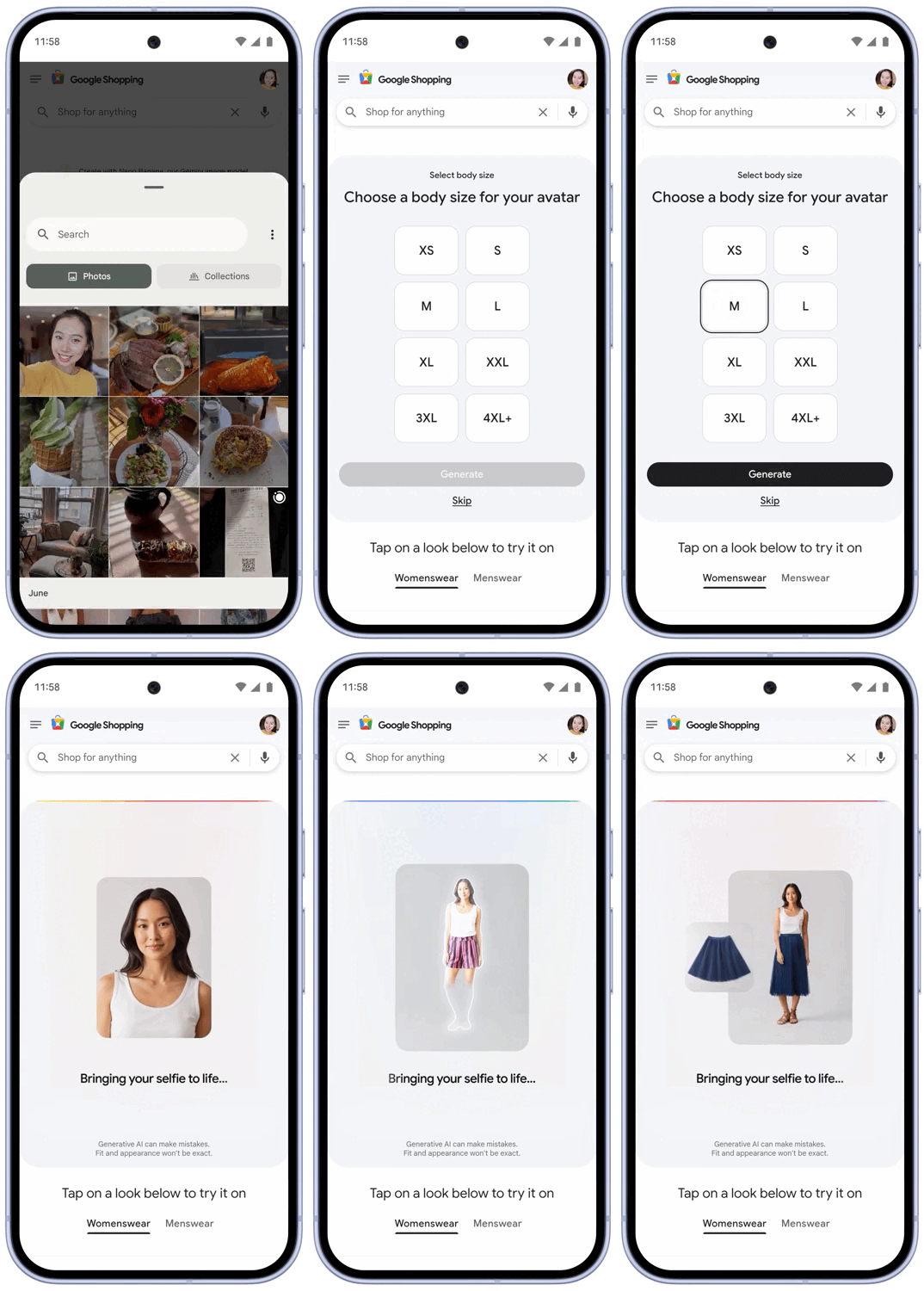
Google just leveled up its AI try-on feature. Now you can virtually try on clothes using just a selfie. Before, you needed a full-body pic, but with Nano Banana, Google’s Gemini 2.5 Flash Image model, it can generate a full-body digital you for try-ons.
Pick your usual size, get a bunch of generated images, and choose your fave as your default. You can still upload a full-body photo or pick from models with different body types if you want.
Personally, I’m still gonna stick with real pics. I don’t wanna end up returning stuff.
Google’s also pushing its Doppl app, which lets you visualize outfits AI-style and discover new shoppable items with a feed of AI-generated videos tailored to your style.
Disney Characters Hit ChatGPT
Disney struck a huge deal with OpenAI. We’re talking about a three-year partnership plus a $1B equity investment to bring its most famous characters to OpenAI’s Sora AI video generator.
If you haven’t checked in with Sora for a while, you can refresh your memory with our post.

That means users can now create short AI videos with 200+ Disney, Marvel, Pixar, and Star Wars characters, including costumes, props, and legendary locations. Yes, you’ve got it right: Mickey, Ariel, Belle, Simba, Elsa, Iron Man, Darth Vader, and so many more inside Sora 2. The characters will also show up in ChatGPT Images.
Disney CEO Bob Iger and OpenAI’s Sam Altman both stressed they’ll do this responsibly, protecting creators while pushing AI-powered storytelling to new heights.
One step closer to having Mickey Mouse give coding advice…
A Powerful Duo
Anthropic is launching Claude Code in Slack. Now you can tag @Claude in chat threads to handle full coding tasks without leaving Slack.
Learn more about its features!

Before, you could only get snippets, debugging help, or explanations, but now Claude scans your messages and bug reports, feature requests, and so on. Overall, it turns Slack into a one-stop coding hub, moving AI assistants from your IDE into the tools teams actually live in.
As we’ve mentioned in our articles, the future of AI coding isn’t just smarter models, but deep workflow integration.
Useful tools ⚒️
ACE Studio 2.0 - Your All-In-One Studio
BON Credit - Reduce your debt with AI
Yolk - Meet your new AI sales training companion.
Keevo AI - AI that discovers & updates your underperforming content
Microedits - Push changes to any website instantly with AI
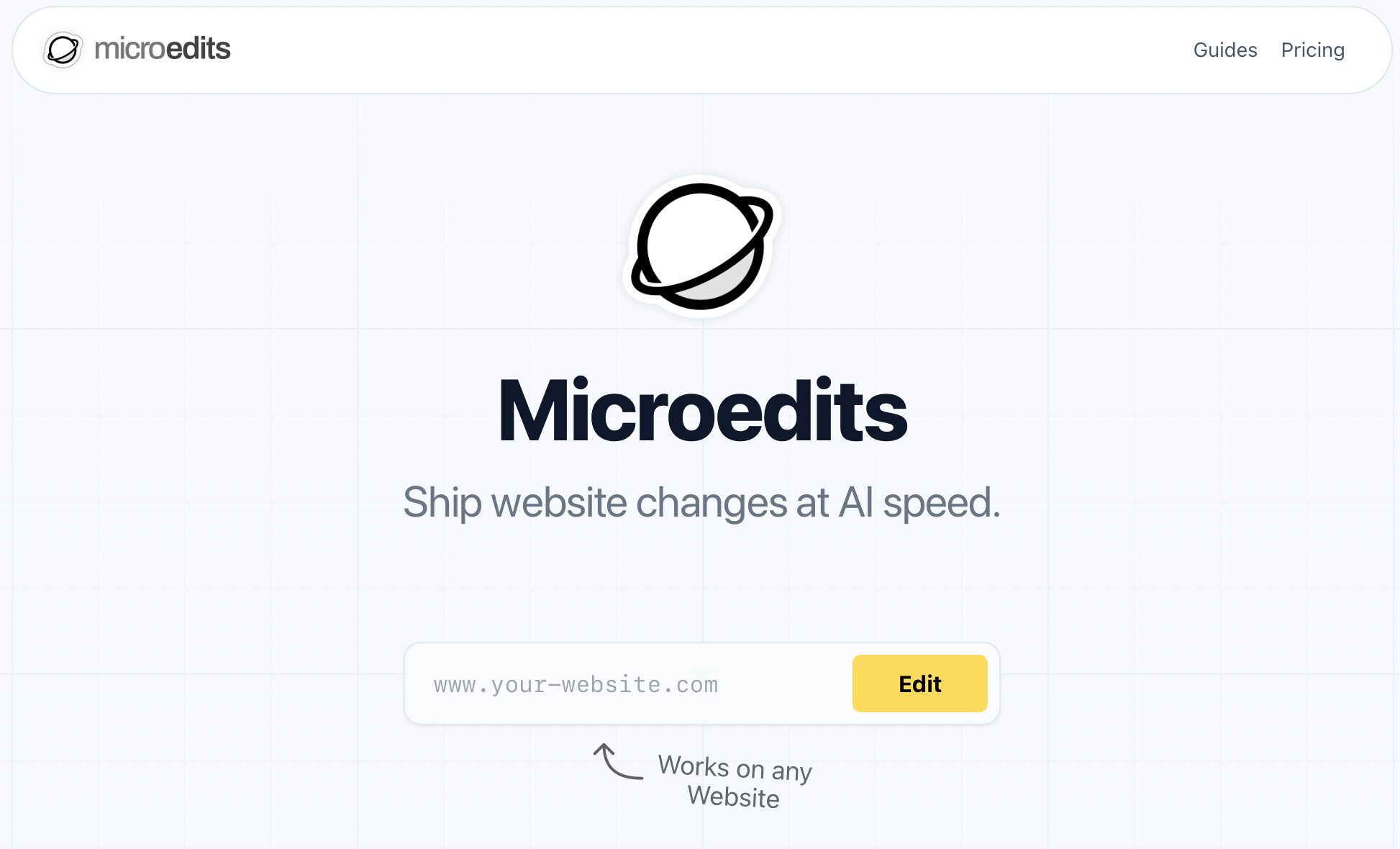
Microedits lets you edit your website just by chatting and describing what you want. This way, you can change text, colors, links, add stuff, or tweak features. It gives instant previews and even multiple versions so you can pick your favorite. When you’re ready, you can publish changes live or roll them back with a click. Works on pretty much any website (WordPress, Shopify, Wix, Webflow, or custom HTML).
Weekly Guides 📕

Claude Opus 4.5 Tutorial: Build a GitHub Wiki Agent
Google Antigravity + Claude Code 🚀 AI Coding Tips (Adding App Auth)
Hailuo AI Video Masterclass: From Beginner to Pro (Full Guide 2.3)
Botpress Tutorial: Build and Deploy AI Chatbots
AI Meme of the Week 🤡
AI Tweet of the Week 🐦

Bonus Materials 🎁
Commission opens investigation into possible anticompetitive conduct by Google in the use of online content for AI purposes - To discover Google’s alleged AI misuse
Transformative AI is coming, and so are the risks - To learn how AI will evolve next Year, according to Google DeepMind CEO Demis Hassabis
AI in 2025: From Agents to Factories - to listen
Anthropic’s philosopher answers your questions - To watch and understand why there is a philosopher at an AI company