

Hello friends!
Many of you already create content, or have been thinking about starting. No matter your field, you already have knowledge worth sharing.
Content creation can feel time-consuming and messy, unless you offload part of the process. Nowadays, creators are using AI agents to research topics, structure ideas, plan content calendars, and support publishing without being involved in every single step.
That’s why we want to share practical tips from creators on how they use AI to build content more efficiently — the approaches we use ourselves.
In this article, we’ll explore
How creators build their autonomous systems
Discover what else you can do with AI in Email Marketing
Luan Doan Set Up MCP to Schedule Substack and It’s Not That Hard
Most people quit blogging because it’s manual and repetitive (I get why this happens).
You’re supposed to remember what to post, when to post, and somehow still have the energy to do it consistently.
In the previous newsletter, we talked about optimising Claude Code and pushing it to work harder for you. In this case, we’ll see that even Claude Chat can do a lot more than people think and solve this problem.
What’s the idea?
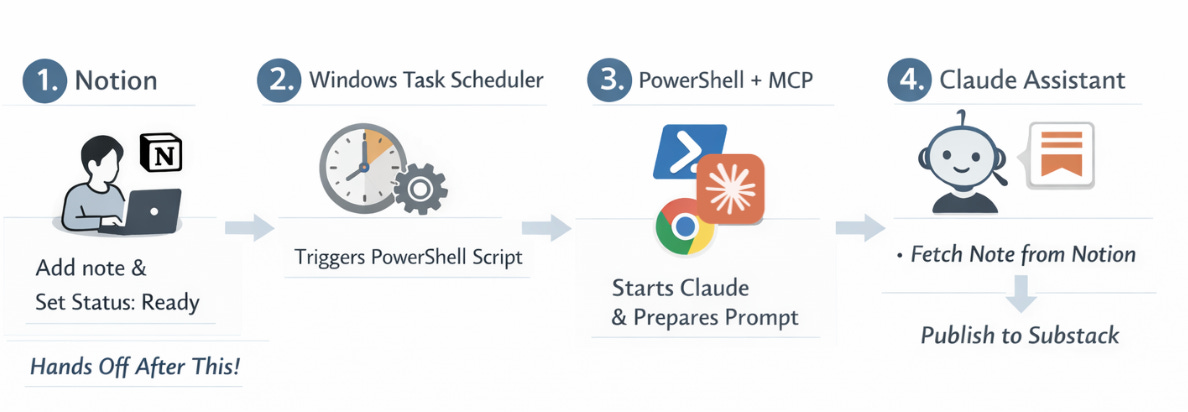
The author built an automated Substack Notes publishing agent using Notion, Claude Desktop + MCP, and Windows Task Scheduler.
It’s a self-running content system that simplifies the setup, allowing your publishing workflow to run automatically and reliably over time. Your AI connects directly to all your tools, databases, and systems.
You just need to dedicate your time to writing!
🛠 The full workflow
You’re the main character in the beginning
Open Notion
Add an idea or a finished note
Set Status = Ready
But after that, no more decisions.
The scheduler is in charge of time
Here, Windows Task Scheduler (or you can use an open-source Task Till Dawn for macOS) runs at fixed times. At each slot, it triggers a PowerShell script.
PowerShell glues everything together
This cross-platform tool serves to start the AI and hand it instructions:
launches Claude Desktop
opens a new chat
pastes a pre-written prompt file
hits Ctrl + Enter
switches to the browser
That’s it.
When Claude embarks on
Claude reads the prompt:
“Help me publish one Substack Note from Notion…”
Then Claude follows the list of duties:
reads entries from Notion
filters by Status = Ready
picks the first one
publishes it to Substack
updates the status to Posted
No Ready notes? Nothing happens.
Why this matters
The setup might look technical at first, but it works. Take your time to analyze every word in this case, because:
Publishing becomes a background process
Content goes out even when you’re busy
It’s a kind of clean content pipeline
Like everything else in this article, this is built for solo entrepreneurs, freelancers, consultants, and AI enthusiasts.
How a French Creator Automated His AI Newsletter

This workflow tackles the same problem, just with a different toolset.
The original case is in French, created by Louis Graffeuil, but it’s absolutely worth the read. If you want to go deeper, you know that AI can always handle a clean translation for you.
What’s the idea?
All the logic is inside n8n and built around four layers:
trigger > content > quality control > delivery
The cool thing about this workflow is that it takes care of all the tedious stuff, such as monitoring news sources, filtering for what’s actually relevant, then laying out and sending the email.
The exact same system can run 5-10 different newsletters. You just swap the prompts and the sources.
🛠 The full workflow
n8n schedule the start
For example, every Monday morning. After this, the workflow kicks off automatically.News discovery (Tavily)
This tool works as a search engine designed specifically for AI workflows. Tavily searches for articles, news, sources, and images.
What you get: raw material (URLs, excerpts, visuals)
First-pass filtering (OpenAI)
Our old friend:
analyzes Tavily’s results
keeps only relevant items
removes duplicates and weak sources
What you get: a clean shortlist of the week’s key topics.
Split Out in n8n
This creates a prepared editorial backbone. Content is divided into 2-3 logical sections, for example:
Main story
Key updates
Emerging trends
Deep research per section
Here, Tavily is called again, but this time on a topic:
full article text
supporting images
Now, you’re working with depth summaries.
Writing the newsletter (OpenAI)
OpenAI turns these raw inputs into email-ready text. So, it takes into account:
tone
audience
newsletter voice
Aggregation
Its focus is on merging all sections into a single draft.
Final validation (OpenAI)
It puts the draft up for review:
logical flow
transitions
headline quality
formatting
OpenAI generates: a refined title and improved structure
YOU step back in here
Some manual steps can’t be avoided. You should:
add your point of view
sharpen the CTA
align the issue with current business goals
This is the moment that separates a strong newsletter.
Formatting & sending
The system creates an HTML template and uploads the email to Brevo (Brevo can be switched to Beehiiv or Substack, or any other Newsletter Platform)
Sent only after your final check
Why this matters
Obviously, AI doesn’t replace the creator, but it replaces the grunt work. It filters out the noise, adapts content for your audience, and matches the style you need.
We remain the editors and carriers of meaning.
Now let’s move on to deeper examples.
