

Hey!
31.4 million views. 66,000 likes. Two days.
That was Jev's launch on X. The browser agents, coding plugins, model routers, clones, memes, and millions of YouTube views came next.
How Jev Took Over X, Then Everywhere Else
Jev did not have a normal developer-tool launch.
It escaped the developer bubble in roughly 48 hours. When Matt Van Horn checked the live counters, TypeSafe founder Diogo Almeida's announcement was sitting at approximately 31.4 million views and 66,000 likes on X. The Jev Ultrafast browser demo had added another 1.8 million views in a day.
Then the launch jumped platforms:
The main Hacker News launch thread reached roughly 1,863 points and 490 comments during Van Horn's research window.
His source sweep found 314 X posts, 75 YouTube videos, 113 Reddit threads, and 133 Hacker News stories discussing or demonstrating Jev.
Those YouTube videos accumulated more than 4.5 million views in the first wave.
Developers shipped browser agents, compaction plugins, routers, tutorials, directories, and Jev-like clones within roughly 72 hours.
Those totals come from Van Horn's launch-week research, were captured at different moments, and are gross counts before deduplication. They are a snapshot of the wave, not clean audience analytics.
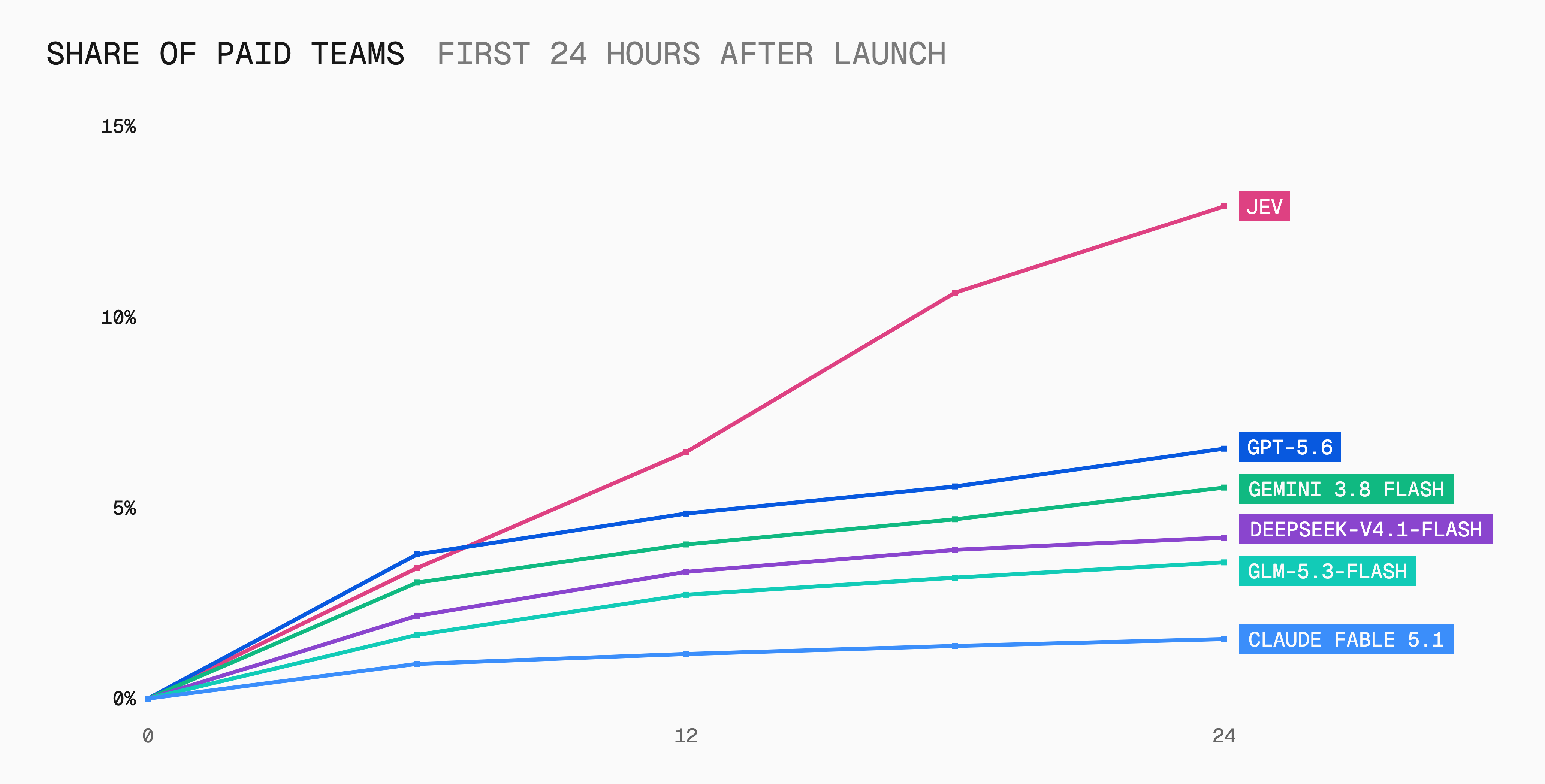
The stronger signal was not social engagement. It was usage. Vercel reported that nearly 13% of its paid AI Gateway teams tried Jev within its first 24 hours on the platform, more than twice the adoption of any previous model launch in AI Gateway history.
Why did it spread so quickly?
The idea fits in one sentence: AI multiple choice, not AI essay writing.
The benchmark was built for screenshots: 193.6x faster, 444.6x cheaper, $42 per billion input tokens.
The demos moved: browser races and game agents made a probability model visually obvious.
Builders could touch it immediately: Vercel, Cloudflare, OpenRouter, SDKs, docs, and an agent skill were ready.
The controversy created distribution: “can't hallucinate,” “just a classifier,” and benchmark disputes gave both supporters and skeptics a reason to share it.
Even the name became a meme: “Jev” quickly became “My name is Jeff.”
Virality is not validation. Thirty million views do not prove that Jev is accurate enough for your workflow, and first-day usage does not tell us how many teams will still use it in three months.
But the launch does reveal why the idea resonated: builders are tired of paying a reasoning model to make every tiny decision. Jev gave that frustration a product and a three-word mental model:
AI if-statement
That is why it went viral. The practical question is no longer “what is Jev?” but where should it sit inside an AI workflow?
We have spent the last few years forcing chatbots to behave like software functions.
Give an LLM a customer email. Ask it to return JSON. Tell it not to add commentary. Parse the answer. Validate the schema. Retry when it wraps everything in Markdown. Pay for a paragraph of reasoning when all we needed was:
Billing, technical, or sales?
TypeSafe looked at that whole pattern and asked a slightly rude question:
What if the model stopped writing and just made the decision?
That is Jev, the first model in a new category TypeSafe calls System One Models.
Think AI multiple choice, not AI essay writing.
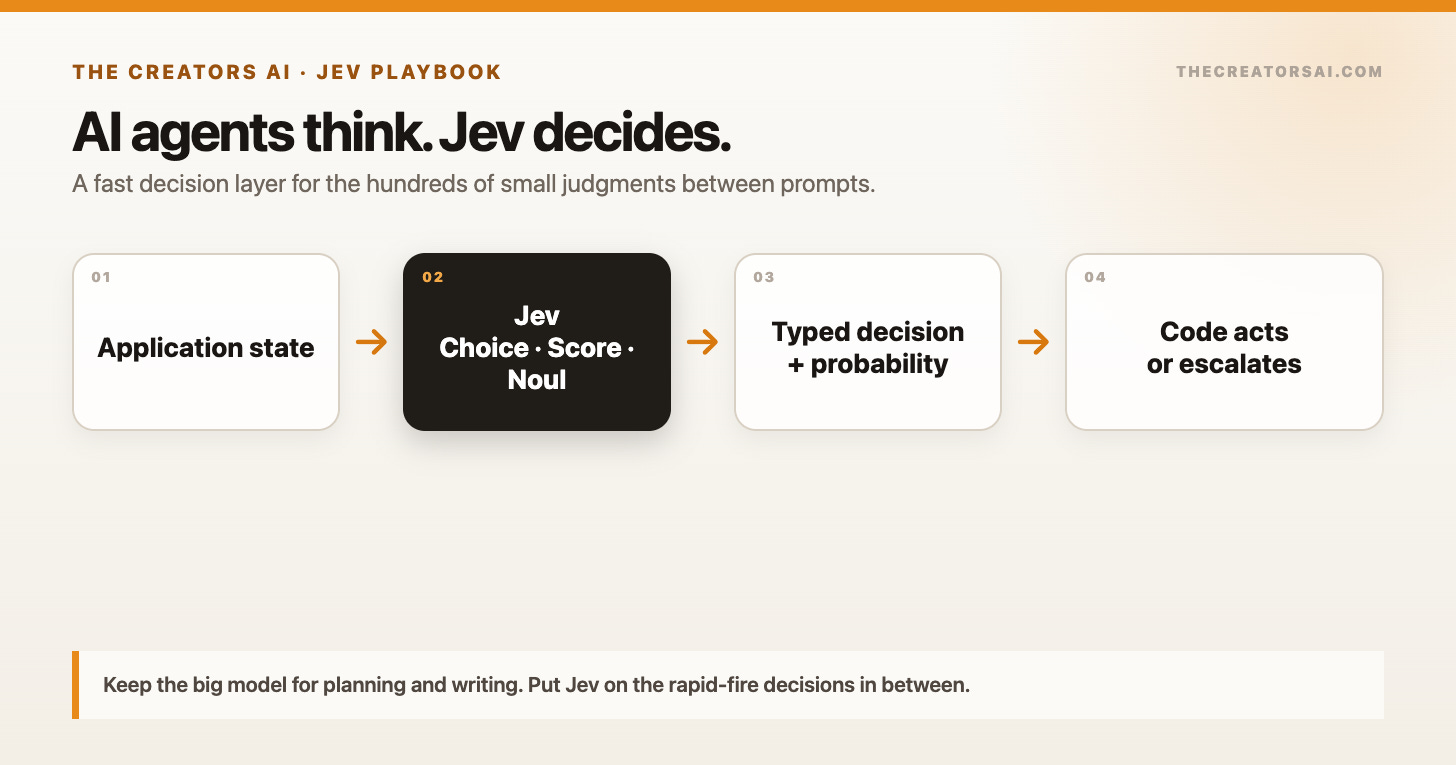
Jev takes the current state of your application, evaluates one or many typed questions, and returns answers with probabilities your code can act on. It does not write emails. It does not build your landing page. And no, it will not replace Claude, Codex, or ChatGPT.
It sits between their steps and makes the small judgment calls that are currently too fuzzy for normal code and too frequent for a frontier model.
Matt Van Horn's excellent field report found nine patterns people started building within days of launch. I went through those cases, TypeSafe's live documentation, the early integrations, and the known limitations to answer the more useful question:
Where does Jev actually belong in your stack, and how do you try it today?
At a Glance
Jev is a decision model, not a chatbot. State goes in; typed choices, scores, and yes/no probabilities come out.
TypeSafe reports 70-500ms end-to-end latency and 40-200x speedups on System One-shaped tasks. Its headline workflow result is 193.6x faster and 444.6x cheaper, but those are vendor benchmarks, not a universal promise.
Direct pricing is $0.042 per million input tokens. Output tokens are free because Jev is not generating prose.
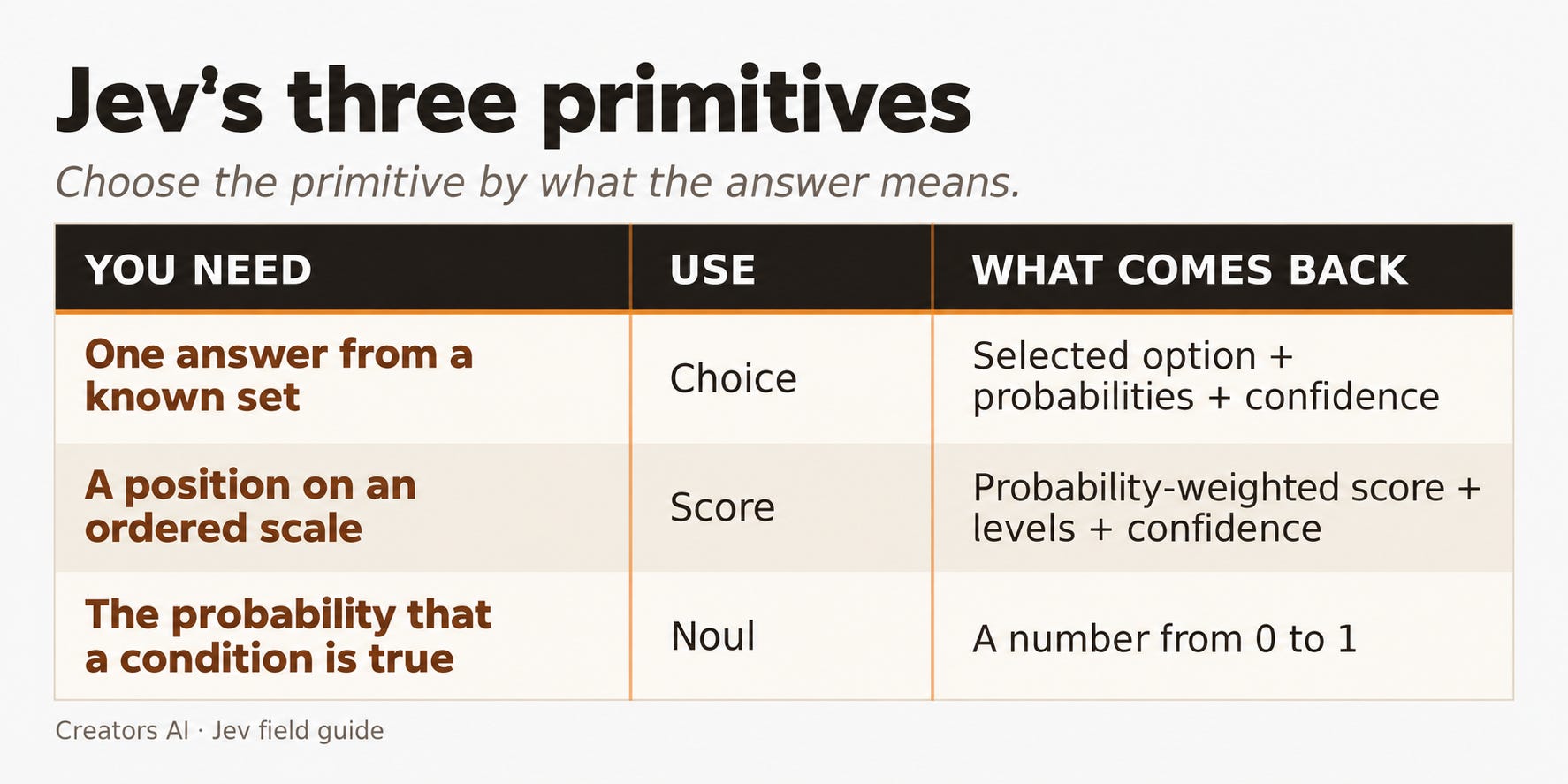
The three primitives are Choice (pick one option), Score (place something on a defined scale), and Noul (probability of yes).
The strongest pattern is: fast model reacts, slow model plans and writes.
Jev cannot produce a malformed or out-of-schema answer. It can still choose the wrong valid answer. That distinction matters.
You can try Jev through OpenRouter, Vercel AI Gateway, or Cloudflare Workers AI, then install TypeSafe's skill in Codex or Claude Code to build with it.
What Jev Actually Is
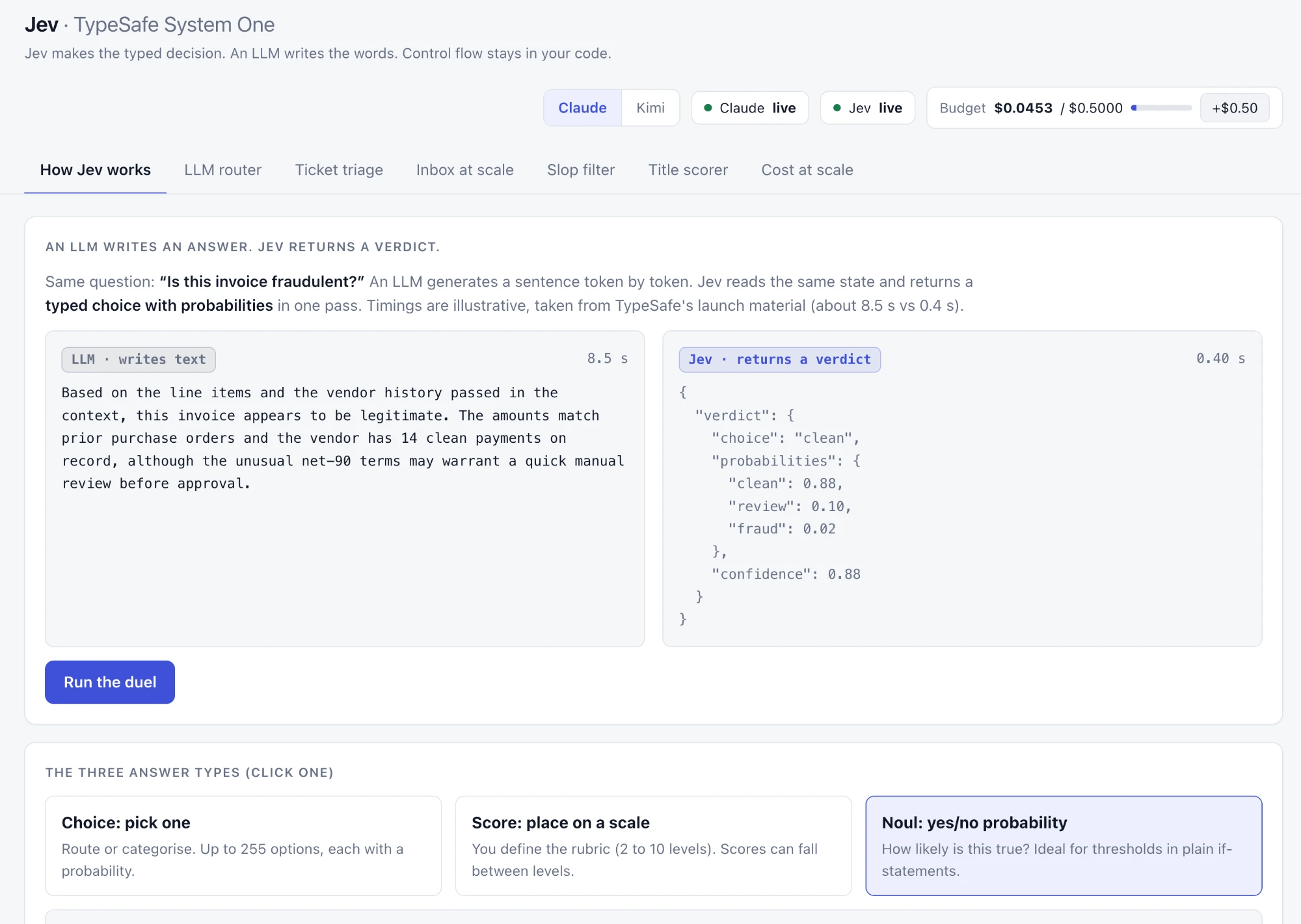
Normal LLMs produce strings one token at a time.
That flexibility is why Claude can write an essay, Codex can edit a repository, and ChatGPT can explain quantum mechanics using a pizza. It is also expensive when the job is simply choosing one of five queues.
Jev gives up text generation. In return, it produces bounded decisions in parallel.
You can send many independent questions about the same state in one request. Jev evaluates them together instead of holding twenty separate conversations.
For a support ticket, one call could decide:
Which department owns it?
How frustrated is the customer?
Is the issue urgent?
Is there a legal threat?
Can an automated reply resolve it?
Your code still owns the workflow. Jev supplies the common-sense judgments.
That is why my favorite description is not “a new kind of frontier intelligence.” It is much simpler:
Jev is an AI if-statement.
Normal code can evaluate order.total > 100. It cannot reliably evaluate customer sounds ready to churn without a pile of brittle rules. Jev handles the fuzzy condition; code decides what happens next.
LLM vs. Jev
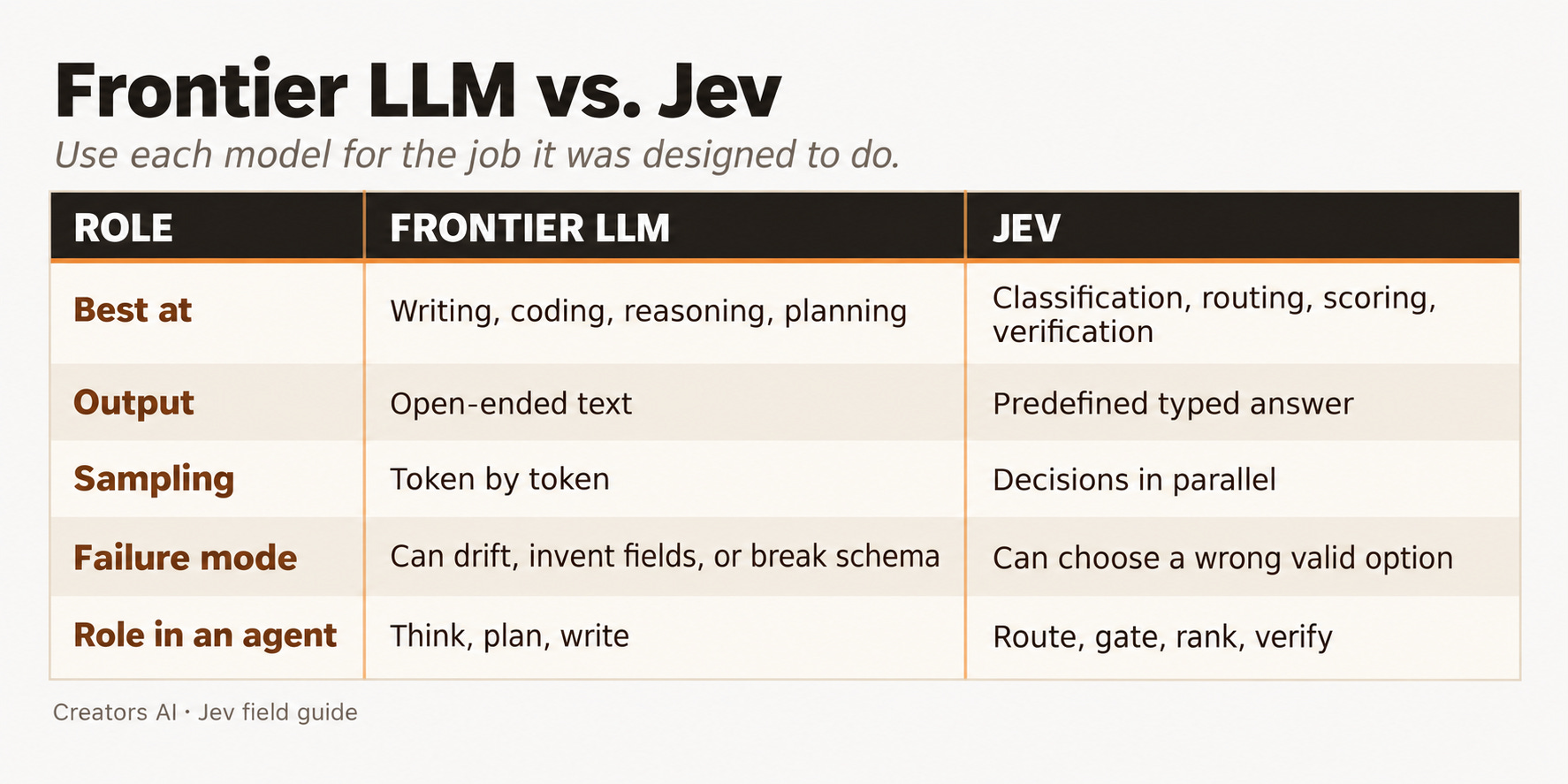
This is not a replacement story. It is a division-of-labor story.
Keep the big model for the hard thinking. Put Jev on the rapid-fire decisions in between.
9 Practical Jev Workflows You Can Copy
The interesting part of a new model is not the launch demo. It is what builders do once the API lands in their hands.
So each case below includes a simple build brief you can paste into Codex or Claude Code. The prompts assume you are using the TypeSafe skill and OpenRouter's Decisions API. They also start in shadow mode: Jev logs what it would do before it controls anything important.
Here are the nine patterns from the first wave that I would actually build.
1. A browser agent that chooses instead of overthinking
The open-source Jev Ultrafast browser agent completed a Google Flights task from Zürich to London in 7.1 seconds.
The architecture is the useful part:
Code reads the page and creates a list of possible actions.
Jev picks the operation and the relevant page element.
A small LLM wakes up only when text must be written.
The browser executes the action and repeats.
A normal browser agent asks one general model to inspect the page, reason through the goal, choose an action, and describe a tool call at every step. That is powerful, but painfully slow inside a loop.
Jev receives candidates from the DOM and selects one. The browser creates the menu; Jev picks from it.

This pattern extends far beyond flights: desktop automation, form filling, internal admin tools, and any interface where the action space changes after every click.
Build it with Codex or Claude Code
Use the TypeSafe skill. Build a local browser-agent demo with Playwright and
OpenRouter's Decisions API using `typesafe/jev-1.13`. At each step, read only
visible DOM controls and create a bounded action list. Ask Jev to choose the
operation and compatible target in one request. Call a small text model only
for TYPE_TEXT. Add freshness and visibility checks, DONE and BLOCKED outcomes,
an inspector that shows probabilities, fixture tests, and a recording of one
real task at 1× speed. Never turn model output into selectors or executable JS.
2. One-second context compaction for coding agents
Every long Codex or Claude Code session eventually hits the same wall: too many tool calls, file reads, logs, and dead ends in the context.
The common fix is summarization. Another LLM rereads the conversation and writes a shorter version. That takes time, costs tokens, and can erase an important constraint.
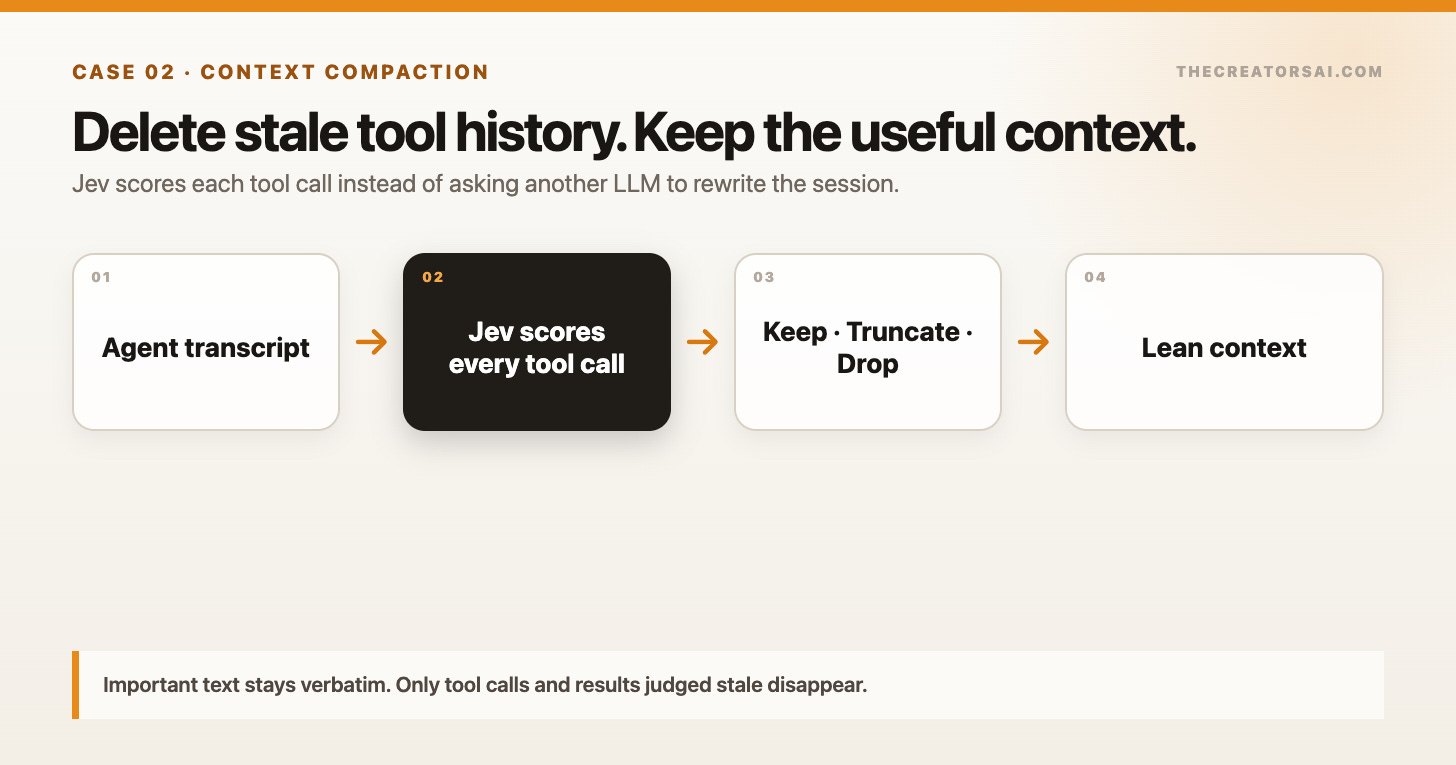
Fast Jev Compaction takes a different approach. It scores each tool call and result for relevance, then drops or truncates the stale material while keeping important content verbatim.
Matt's report includes a Claude session reduced from nearly 1 million tokens to 86,000 in about one second. Treat that as an early self-reported result, not a benchmark guarantee. But the design is smart even without the viral number.
Why summarize a file read that no longer matters when you can remove it?
For coding agents, this may be the sleeper use case. Faster compaction means longer useful sessions, fewer expensive summaries, and less context pollution from abandoned approaches.
Build it with Codex or Claude Code
Use the TypeSafe skill and the `fast-jev-compaction` repository. Add an
OpenRouter Decisions transport using `alpha.decisions.create` and
`typesafe/jev-1.13`. For every old tool call, ask two Noul questions: should
the call stay, and should its result stay verbatim? Pin the first message and
the six newest messages. Keep, truncate, or drop each call in code. Preserve
all user and assistant text, report the reduction ratio, and fall back to the
original transcript on any API, parsing, or size error. Add fixture tests
before connecting it to a real Claude Code session.